
|
| Greg's diary |
| March 2011 |
|
|
||||||||||||||||||||||||||||||||||||||||||||||||||||||||||||||||||||||
|
|
|
|||||||||||||||||||||||||||||||||||||||||||||||||||||||||||||||||||||||||||||||||
| Tuesday, 1 March 2011 | Dereel | Images for 1 March 2011 |
| Top of page | ||
| next day | ||
| last day |
|
Autumn already
|
Topic: gardening, general | Link here |
The
long hot summer is over. It barely seems to have begun. The temperatures seem
to have been significantly lower, but that doesn't quite match my records: this summer was,
on average, only 0.92° cooler than last year, and January was actually 0.9° warmer:
It's still very cool—today's maximum was only 18.4°—and I didn't do much in the garden, though I really should. Oh for some motivation.
|
Network woes: Give me WiMAX
|
Topic: technology | Link here |
A while back I tried to get a WiMAX Internet connection from Aussie Broadband, but was told that I wasn't in range because of terrain issues. That looks unlikely, and today I decided to try a little harder. On the positive side, I was able to find their pricing page this time: for $39.95, the same price I pay Internode for 9 GB at varying speeds up to a theoretical 7200/2000 kb/s, I could get 20 GB at 12000/1024 kb/s for WiMAX.
Called them up and was told that it wouldn't work. Finally got a connection to David, who runs the software that does the determination. He told me that the hills in Enfield were in the way of the line of sight (to Mount Warrenheip), and that the distance was 33 km. Both of those seemed unlikely to me, so went and did my own calculations. That's part of a web page I'm setting up to show direction and distance for the wireless towers in the area.
And yes, unfortunately they show that Mt. Warrenheip is 33 km away. They want to limit things to 30 km, but might be prepared to bend the rules if I buy a better antenna. But it does look as if the area round Enfield State Forest could be in the way of line of sight, and at 3.6 GHz the line of sight appears to be imperative. Also checked for Mount Emu, but that's behind a row of trees, and it's even further away.
On the 3G front, things aren't looking good either. The connection to the Meredith tower remained in UMTS/HSPA mode, but the throughput was abysmal, with ping times up round the 10s mark for a lot of the time. Possibly Optus have done something about the congestion at the Linton tower and not elsewhere. But it still seems as if the tower at Willowvale should be a better bet, so pointed the antenna in that direction (about 258°), and got a much better connection.
For a while. In the evening, it dropped back to GPRS again. More out of guesswork than calculation, turned the antenna another 10° to the south. If, as I suspect, we're getting interference from some other tower, that might help. To be observed.
| Wednesday, 2 March 2011 | Dereel | Images for 2 March 2011 |
| Top of page | ||
| previous day | ||
| next day | ||
| last day |
|
Gone shopping
|
Topic: general | Link here |
The test modem from Internode arrived today and needed to be picked up, and I also needed to exchange the Netgear MBR624GU router, and a library book was waiting for collection, so into town to handle that. Problem: I had arranged to pick it up at the Sebastopol library, but it isn't open all the time. I had already missed them last week, when they closed at 13:00. It was well before that when I arrived—but on Wednesdays they don't open until 14:30. Missed again!
The rest worked relatively well. Had just returned the router when I felt a pain in my left leg, reminiscent of a cramp or the injury I had last September. But why did it happen then? I have no idea. Over the course of the day it gradually diminished to the point where I no longer needed to hobble.
|
More modem tests
|
Topic: technology | Link here |
Back home and put the new modem into my machine. Not surprisingly, it worked just about as well. Surprisingly, it didn't go into HSPA mode, but possibly it had 1 dBm more signal than the other one. Is this a firmware difference? I've forgotten how to read out the firmware ID. It's clearly the same model. From the log file, probe results for the old and new modem:
But that doesn't make any difference. Looked at the package: “HUAWEI E169E”. They've reused the product ID of the E169 for the E1762! What a mess. It explains the lack of HSPA, though: the E169 doesn't do it.
Called up Internode support and spoke at length with Tristan, who ultimately wasn't able to do very much. He did access a map of the towers in the area—something I thought they didn't have—but wasn't able to give me access to it. At least it gives the names of the towers: Wallinduc is really called Willowvale, and Linton is really in Linton. But since pointing my antenna further south, I've had no further dropouts or dropbacks to GPRS mode, so there's little difference to note.
| Thursday, 3 March 2011 | Dereel | Images for 3 March 2011 |
| Top of page | ||
| previous day | ||
| next day | ||
| last day |
|
Mummy's wish
|
Topic: general, opinion | Link here |
Somehow I'm getting lots of unsolicited phone calls lately. Today there was one from Patrick at Mummy's wish, asking for money. Yes, doubtless they're worth supporting, though the way they restrict their attention to mothers seems discriminatory to me. And there are so many other worthy charities. After I finally got him to stop talking and listen instead, I asked why he didn't respect my wish not to be called, and got the standard answer “But we're a charity, we're allowed to do that”. Indeed they are. And, as I explained to him, I'm allowed to give them nothing. Why do people do this?
|
Mobile phones are bad for you!
|
Topic: general, opinion | Link here |
Also got a call from somebody who acted as if I should know him, and only gradually revealed that he was Rick, and even more gradually that we don't know each other. Then, for no apparent reason, he spoke to me in German for a while before switching back to English. This one wasn't a no-call violation, though: he had read my page about the mobile phone towers, and told me that it was incorrect.
It took a while to get out of him which page he was talking about—apparently he had found it via Google and didn't have it in front of him—but when I asked him what was incorrect, I got no clear answer. He seemed to think that if I were neither a biologist nor a physicist, I would not be in a position to comment. That opens up a number of issues: first, of course, you don't have to be a specialist to assess information presented to you. And second, how many biologists and physicists are there out there? Is he one? I didn't ask.
He did, however, volunteer the information that he has had a brain tumour removed. I don't know if that's directly (due to the tumour) or indirectly (due to the psychological issues) related to his somewhat unusual behaviour, but it's understandable that he should research things. And research he did. It seems that all the reports, such as the one done by T-Mobile (now Telekom Deutschland), have been suppressed by the telecommunications industry. He has copies, however, but they get removed from the web: the links get hacked and they go down. Clearly a case for Julian Assange: he may be able to leak the US Military, but can he leak the telecommunications industry?
One thing that he did agree on, though: it's the handsets, and not the towers, that pose the greatest potential danger. It seems that they open up the blood-brain barrier after two minutes of talking. He also referred to a paper by Lennart Hardell, which I should have read. That is available on the web (and linked to from the Wikipedia page on mobile phone radiation and health).
And yes, it claims that the handsets can increase the incidence of tumours in people who have been using them frequently for over 10 years. How reliable is it? I don't care enough to analyse it, but clearly it's open to discussion. The paper was published in April 2007, which probably means it was completed some time in 2006. Ten years before that, everybody (in the test at any rate) was using analogue phones. And the more I read the article, the more uncertain I become. They used a confidence index of 95%, not overly high, and the increases they measured were marginal. Certainly the paper gives no reason to believe that mobile phones are the main cause of brain tumours. And there's the case, like the diabetes “epedemic”, where improved medical testing can show diabetes in marginal patients such as myself, where previously they would have remained undiagnosed. I consider it not impossible that something similar might apply here: the most common form was a vestibular schwannoma, which the paper calls an acoustic neuroma. They're benign, and in many cases don't get treated even after diagnosis.
In any case, I'm still waiting for the information Rick was going to send me. He originally sent 8 documents, which were rejected because of the message size (currently set to postfix's default of 10 MB). And since then I haven't heard anything.
|
Optus' Rokewood mobile tower
|
Topic: technology | Link here |
While thinking about mobile towers, wondered when Optus will erect the tower in Rokewood. Off to take a look. There's certainly nothing there yet, and if Greg from Optus hadn't told me where they're planning to build it, I wouldn't have known:


|
|||||||||||||||||||||||
It'll be a while before I can use that tower.
|
Spirits for fondue
|
Topic: food and drink, opinion | Link here |
Fondue de fromage again today, and we discovered we had no spirits to add to the fondue. We can't even find Kirsch here. In desperation tried cooking brandy, which didn't taste too bad. But maybe vodka would be better if I can't find any fruit spirits.
| Friday, 4 March 2011 | Dereel | |
| Top of page | ||
| previous day | ||
| next day | ||
| last day |
|
USB stick based router
|
Topic: technology | Link here |
My network problems are bearable at the moment, but I still don't have a router machine: I'm using a machine belonging to Chris Yeardley with the partially completed system upgrade that was really destined for dereel. I can't continue with the latter until I have a replacement router.
The obvious solution is an old laptop. I have a whole pile of old laptops, one of which could conceivably do the job:
The Dell Inspiron 5100 that normally runs pain, my Microsoft system. Apart from the fact that I don't want to change that, it has some issue that makes it shut down at random intervals, making it useless for a router.
The Dell Inspiron 1150 that I had been using as a router. It has a dead USB bus, making it completely useless for this application (the modem is USB too).
Another Dell Inspiron 5100 that I bought for parts last August. I think the motherboard still works, but the keyboard doesn't work properly, and the display is flaky—both things that aren't a show-stopper in this application.
An Inspiron 5150 belonging to Chris. Noisy, and there's a tendency for it to overheat.
A whole lot of even older laptops, mainly with some issue or another. I don't want to try them because of potential USB issues, though I might if I don't find an alternative.
My last PATA disk died a while back, and it doesn't seem to make sense to have a disk on a machine that barely needs to access mass storage. The most obvious approach is to try to use the scrap Inspiron 5100 with the system on a USB stick, first trying with Chris' old machine until we get the wrinkles ironed out. First step was to get the system on an 8 GB stick. Nothing complicated about that, right? Well, it didn't fit in the only free slot in cojones, between the modem and the RJ-45 Ethernet connector, so put it in teevee instead. And there I saw, repeatedly:
=== root@teevee (/dev/pts/1) ~ 61 -> newfs /dev/da1s1a
What's that “bad magic number”? I've just written it. But it was fatal, and it was repeatable, even after zeroing out the entire area. Some problem with the USB stack? With the stick? With the hub? The latter was the cheapest I could find, mainly because it was formed as a mug warmer, and it seemed the easiest to check. Finally removed the stick and squeezed it into the free slot in cojones, where things worked. But what a copy speed! By the evening it had copied about 1 GB of the 6 GB on the system disk, and I discovered I was copying the entire /usr/obj hierarchy, the operating system object files. We don't need that, so I deleted them while the tar was running.
And tar stopped copying! This is BSD tar, mainly because the port for GNU tar no longer has a man page (who needs documentation anyway?). I can start all over again tomorrow.
|
More pruning
|
Topic: gardening | Link here |
Somehow the summer never arrived, but it seems to be going now. Spent some more time removing plants, mainly Watsonias. They won't come back close to the house.
| Saturday, 5 March 2011 | Dereel | Images for 5 March 2011 |
| Top of page | ||
| previous day | ||
| next day | ||
| last day |
|
Alternatives to commercial routers
|
Topic: technology | Link here |
Started copying my USB stick again today. I'm really making less than 100 kB/s, and it won't be finished until tomorrow. I hope this doesn't have any implications about the speed of the system once it's up and running.
But what if none of the laptops work? There are plenty of devices out there with specifications like the external routers, but with user-loadable software. I had heard of Soekris before, but not thought of them in this context. That's probably just as well; none of the ones I've seen on sale (cheaply) have a USB slot, though they do have such models. Then there's ALIX, which comes from Switzerland; the cost of the postage could be an issue there, and none seem to be available in Australia. Many of these things come with software that I have only marginally heard of, such as M0n0wall—also from Switzerland—FreeNAS and pfSense. Interestingly, all are based on FreeBSD. Plenty to investigate there.
|
Summer returns
|
Topic: photography, gardening | Link here |
Today is the day of the week which I normally spend taking photos of the garden, but it was far too windy, and I decided to put it off until tomorrow. On the other hand, the weather was better for once—temperatures over 20°, lots of sunshine, and lots of butterflies:

|
|||||||||||||||||||||||

|
|||||||||||||||||||||||
Where are they? They're there, but they're really difficult to see, maybe because this time they're white. I wish I know how to do it better.
|
Paulownia
|
Topic: gardening | Link here |
The Paulownia kamikawii has grown considerably in this season. We hadn't anticipated to what extent it would overshadow the garden path. Here a comparison from four months ago and now:

|
|||||||||||||||||||||||

|
|||||||||||||||||||||||
At least the leaves make it easier to identify, but it must have grown by 50% in that time.
|
Sick gazanias
|
Topic: gardening | Link here |
Our gazanias are doing really well. The second is one of the cuttings that we picked up in Stawell in September:

|
|||||||||||||||||||||||

|
|||||||||||||||||||||||
Well, some are; others are just plain dying:

|
|||||||||||||||||||||||

|
|||||||||||||||||||||||
All that's visible in the last image is couch grass. Why is that? The first to die were under the Paulownia, so it seemed reasonable that the Paulownia was sucking up too many nutrients, though Gazanias seem to be very tough. But the ones that are dying now seem to be at random. Nothing to worry about—I can't imagine them all dying—but it's puzzling.
|
Cleaning up the cathedral
|
Topic: gardening | Link here |
The cathedral has been pretty neglected lately. Usually we can stop mowing the lawn round early December, since the grass stops growing then. But this year the grass has grown all through the year, along with a copious amount of weeds. Today I finally got round to mowing the lawn, which is really a three-stage thing: first with the ride-on mower, then with the hand mower (what do you call these things? It's a motor mower too, just hand-pushed), and finally with the whipper-snipper. Got the first two done; now we should put down some weed mat round the birches.
|
More Greasy Heel
|
Topic: animals | Link here |
Darah's Greasy Heel hasn't got any better—if anything, it's worse, and we were planning to take her to the vet on Monday, but Chris came over this afternoon and took a look at getting the scabs off. It's not a pretty sight, but she did quite a good job. Hopefully that will help us get it under control.

|
|||||||||||||||||||||||

|
|||||||||||||||||||||||
Where does it come from? Three years ago we decided that it was because of the excessive sunshine, but the year after we had much more of it, and this year there hasn't been much sun. This year was moist, certainly a good enough reason, but it's interesting to note that the problem started round about the same time. Three years ago it was on 11 February 2008, and this year it had been going for a week or two before I reported it on 22 February 2011. And that's roughly the time that the March flies come into their own. I suspect there's a connection.
|
Pepper steak sauce
|
Topic: food and drink, opinion | Link here |
Pepper steak for dinner tonight. It's really just a normally grilled fillet steak with a pepper and cream sauce on top. It was a favourite of my father's and mine when we were in Sarawak (where the pepper grows) in the late 1960s. I've made it a couple of times since then, but for some reason never wrote down the quantities. Tried it this time, but it's still not completed. The real problem is to get the pepper at the right consistency.
| Sunday, 6 March 2011 | Dereel | Images for 6 March 2011 |
| Top of page | ||
| previous day | ||
| next day | ||
| last day |
|
How not to take panoramic photos
|
Topic: photography, opinion, technology | Link here |
Yesterday I put off the house photos until today because of the wind. That didn't help: it was windier today. So what could I do? Motion completely messes up HDR (tone-mapped) photos, and it's not much good for panorama stitching either. On the other hand, it was the first weekend in the month, and I have extra photos I take then, and in addition I took last week's photos a day early. The weather forecast predicts even more wind for the rest of the week, so I had to do the best I could to get some kind of useful photos.
The first issue is tone-mapped HDR: that's necessary because of the limited pixel depth of modern sensors (12 bits on the E-30). Arguably the HDR results compare to adding two bits, and some of the competition have 14 bit pixel depths. But it's still not enough; it's time for the manufacturers to come out with 16 bit sensors. Still, I can fake some things with software.
The most obvious issue is exposure. For panoramas you're supposed to use the same exposure for each image. The real brightness of the subject changes considerably, particularly when the sun is shining, or under the verandah. How about letting the camera decide the exposure?
Tried a couple of alternatives, one with “normal” centre-weighted exposure and one with spot measurement. The results? Not good. The balance is terrible, and the differing exposures confused Hugin sufficiently that it just couldn't match control points in a number of cases. I had to give up on 6 panoramas. Others worked, but were decidedly sub-optimal. Clearly the method doesn't work. Under the circumstances, it's not surprising that spot exposure (first) works even worse then centre-weighted (second):

|
|||||||||||||||||||||||

|
|||||||||||||||||||||||
The first one had an exposure range from 11.6 EV to 15.3 EV, and the second one from 13.0 to 15.3. Looking at the most extreme individual images from the first panorama, it's clear why it didn't work:

|
|||||||||||||||||||||||

|
|||||||||||||||||||||||
The verandah was a particular flop: the first time round it couldn't find enough control points, and my attempts were particularly unsuccessful. The second time round I tried a single-shot version, stupidly with flash, and got a remarkably bad looking result:

|
|||||||||||||||||||||||
So I had to go back and do the important ones again. Some don't look too bad, but the best thing I can say about the experiment is that I have learnt something.
|
Don't forget your meds
|
Topic: general | Link here |
While working on the photos, felt some pain in my toes, a sort of sudden twinge that left off again. It wasn't really painful, but concerning.
Later I discovered that the toes were also a little swollen and warm. Then it dawned on me: Yvonne off very early with Nemo for dog training this morning: it was a special tracking day, and for some reason those start at 7:00. So: breakfast by myself. And the break in routine meant that for the first time I forgot the Allopurinol pills for gout that I've been taking daily for the last 5 years. I had been warned that missing even a single day could cause a reoccurrence, but it was still surprising that it would happen after only 6 hours. And even more surprising is that it happened in a place where I hadn't had any symptoms before.
|
Filling the vegie garden
|
Topic: gardening | Link here |
As a result of my leg injury in the spring, I didn't get off to as timely a start in the vegetable garden as I had hoped. As late as 11 December 2010 it was looking really bare (first photo), but now I can hardly move in the place:

|
|||||||||||||||||||||||

|
|||||||||||||||||||||||
The overflow is mainly Solanum tuberosum (left rear) and Solanum lycopersicum (right centre). But when will they be ripe? I have lots of fruit, but even at the beginning of autumn they're still green:

|
|||||||||||||||||||||||
| Monday, 7 March 2011 | Dereel | Images for 7 March 2011 |
| Top of page | ||
| previous day | ||
| next day | ||
| last day |
|
Running FreeBSD from a USB stick
|
Topic: technology | Link here |
So finally my USB stick has finished copying, and I put it in a laptop to try it out. It booted just fine, and then failed while trying to mount the root file system. That's not overly surprising, since I had forgotten to change the configuration, and /etc/fstab still pointed at /dev/ad0s1a instead of /dev/da0s1a. So I tried that. Failure.
Further investigation showed that there was no /dev/da0. By chance, I had just heard about that recently: it seems that the default probe time for SCSI devices is too slow for some USB sticks, and you need to work around the issue by putting the following line (or similar) into /boot/loader.conf:
The parameter is in milliseconds, so this waits 5 seconds. That's what others have reported, and it works for me too. While I was at it, I also added the lines:
This tells the system to create and mount /var and /tmp as MFS file systems, greatly reducing the amount of writing to the USB stick. Booted again, but I still couldn't mount root:
But that wasn't the case. This time I entered the mount point exactly as specified (ufs:/dev/da0s1a), and it worked. Another question of timing? To be investigated. Then I took a look at what I had:
=== root@nerd-gw (/dev/pts/0) ~ 3 -> df
Where did that second /var come from? That wasn't so serious, but when I tried out a USB stick with PPP, without a USIM, the chat script failed immediately. That in itself was not surprising, but it didn't log anything: all log files contained a message from syslogd saying that they had been initialized, but nothing else. Is it possible that they're logging to the first instance of /var? Given that there were log files in /var, that seems unlikely. I was going to do some more investigation, but got sidetracked.
|
Power failures: so nice, so nice, we do it twice
|
Topic: general | Link here |
Not one, but two power failures today, one at midday, the other slightly before midnight, just after I had reset the alarm clock. It's particularly annoying to wake up and have to reset the alarm in the middle of the night.
|
More signs of autumn
|
Topic: gardening | Link here |
Our newest mystery plants have finished flowering and the leaves are gradually going yellow:

|
|||||||||||||||||||||||
I suppose that's a sign of the coming autumn, not a disease, and probably caused prematurely by the cool snap last week.
|
Time to move on from Olympus?
|
Topic: photography, opinion | Link here |
One of the annoying things about all digital cameras is the extremely limited dynamic range, as I commented yesterday. That's the background for the tone-mapped images that I take for my weekly garden photos. But not all cameras have the same dynamic range. Today did a bit of investigation on the DxOMark sensor rankings site, which measures and compares dynamic range, amongst other things. According to that, my Olympus E-30 has a dynamic range of 10.4 EV and a colour depth of 21.3 bits. The newest model, the E-5, is hardly any different: 10.5 EV and 21.6 bits, hardly a reason to change. But other brands are much better. The Phase One P65Plus has 16 bits per pixel, and has 13 EV and 26 bits—and a price tag of USD 39,900. Those additional 2.4 EV are more than the gain I get with my HDR stuff, but it's clearly not a camera I should consider buying.
There are others, though, and the Nikon D7000 does very well in a comparison with the Olympus models. Not only does it have a dynamic range of 13.9 EV—3.5 more than the E-30 and even more than the Phase One—and a pixel depth of 23.5 bits (good 2 bits more than the E-30), but it sells for much less than the E-5; I've found prices as low as $1100 for the body, while the cheapest prices for the E-5 are round $1700. The figures suggest that a single image from the D7000 would have almost the same dynamic range as a 5 shot composite taken with the E-3.
Is that a reason for change? I don't know. When I bought my E-510, I had somewhat different goals than I do now. At the time I wanted a small, relatively simple camera with image stabilization and live view. In the meantime I'm spending much more effort on photography, I've discovered that live view isn't all it's cracked up to be, and the even the E-30 (not to mention the E-5) is larger than the Nikon and Canon competition. So maybe it's time to reconsider.
Went looking for the manual, in the process discovering that Nikon has a worse web site than most, and also that they want money or a serial number for a copy of the instruction manual. Or so it seems from their web site. A Google search showed that I could download a non-printable copy of the manual free of charge, and did that. It's more than double the size of the Olympus manuals, and it'll take me a while to find my way through it.
So what's wrong with the Olympus sensors? Yes, they're only 12 bit, where the Nikon is 14 bits. But that doesn't explain the difference of 3.5 EV. Looking back, it seems that their older sensors were no better than Olympus. The issue appears to be that Olympus sensor technology isn't keeping up with the times.
|
Artichokes from the garden
|
Topic: food and drink | Link here |
The artichokes that we planted quite some time ago have finally got to the stage where they have more than one fruit:

|
|||||||||||||||||||||||
We ate the two top ones in the evening. They're surprisingly prickly; I wonder if that's the variety, or whether commercially available artichokes have the pricks cut off. Still, they tasted fine, probably something worth continuing to grow.
| Tuesday, 8 March 2011 | Dereel | Images for 8 March 2011 |
| Top of page | ||
| previous day | ||
| next day | ||
| last day |
|
Updating browsers, the easy way
|
Topic: technology, opinion | Link here |
Fired up boskoop, my Apple machine, this morning and got a message from firefox: without asking, it had downloaded an update and wanted to install it. I thought I had disabled this stuff. But it was there, so I let it run, and after a surprising amount of time it finished, came back and told me that it was out of date, and that I should install firefox 3.6. Now why couldn't it have done that before?
So, follow the instructions, download the package, waited another long time and was finally presented with this window:

|
|
||||||||
Pressing on the arrow did nothing. I really had to drag the firefox image over the arrow into the unidentifiable symbol on the right. Now what earthly use is that? The window (too small, of course) says nothing about what it means; you have to read the separate instructions to discover that this copies the image to the /Applications folder. What's wrong with a dialogue box saying “shall I install the browser?”? Presumably it's not cool enough for the Apple crowd.
That didn't help much, though: there's already an “Application” there:
But it's not here. I've looked for potential images, 15 years after the event, but I can't find anything.
That's to be expected, isn't it, since I've just used firefox to download it, and desperately needed the instructions that were missing in the installation package. So I said “overwrite” and got the message:

|
|
||||||||
That's crazy. Yes, of course the “Application” is “in use” (the process is running): that's what I'm using to install the new version. An “Application” is a directory, not a file, but you can rename them too. In my case, I just stopped firefox and continued with the installation. Finally it finished and came back and suggested I should really be running 4.0-beta. It could have told me that, too. OK, I had invested enough in this experiment, so I downloaded the beta version. And this time the replace message was different:

|
|
||||||||
It turns out that that was correct: revision 3.6.15 is dated 3 March 2011, while 4.0 Beta 12 is dated 23 February 2011. And again, of course, it can't rename things. Isn't it so much easier with a real interface?
=== root@boskoop (/dev/ttyp4) /Applications 3 -> mv Firefox.app Firefox-3.6.app
Well, it would be if “Finder” understood. What it saw was:

|
|
||||||||
Where did that second Firefox-3.6.app entry come from? It's not in the directory, of course. Yet another indication that the Apple GUI doesn't understand the underlying system.
Continued and found:

|
|
||||||||
That's presumably because it's an Intel-only binary, and my old Apple is PPC. That would be understandable if it had told me at the outset, not after downloading 28 MB of useless data and pushing mice about. And to make it clear, it has put a reverse-facing stamp over the icon, which is doubtless immediately intelligible to people who grew up on Apple:

|
|
||||||||
So I removed it again and renamed Firefox-3.6.app to Firefox.app:
=== grog@boskoop (/dev/ttyp1) ~/Desktop 5 -> l -d /Applications/F*
What does “Finder” see?

|
|
||||||||
How can people make and live with such a mess?
|
Photography 70 years ago
|
Topic: history, photography | Link here |
When I moved into my house in Rosbach vor der Höhe in July 1982, the previous owner left behind some old books from the Hitler time (as the Germans call it). There were at least four of them, with titles „Kampf um Norwegen” (Fight for Norway), „Kampf gegen die Sowjets” (Fight against the Soviets), „Das Gesicht des Krieges” (“The face of war”), and one whose title I no longer recall, something like „Deutschland in seiner Not”. The first two were published by the Supreme Command of the Wehrmacht, and were clearly propaganda which I couldn't be bothered reading.
The fourth book was written before the war, about the mid-1930s, and contained an ideologically coloured history of Germany since the First World War. Some time ago I tried reading some of it, in the hope of finding something of redeeming social value—after all, the Germans voted this crowd into power in 1933—but after a few pages of antisemitic drivel I gave up. But the book wasn't a complete loss. It had images of a number of documents in the back, such as the declaration of abdication of Kaiser Wilhelm II, and lists of candidates for elections in the Weimar Republic.
And that's what I went looking for recently, only to discover that it was missing. The party that won the elections of 1933 was not called the National Socialist Party—there must have been 10 different parties with “National Socialist” in their name—but the National Socialist German Worker's Party (German „Nationalsozialistische Deutsche Arbeiterpartei“ or NSDAP). And these details aren't well documented.
But I can't find it. It must be somewhere, and sooner or later it'll turn up. In the meantime I turned my attention to the third book, „Das Gesicht des Krieges”, in which I had found some advertisements for photographic equipment. On closer examination, it proves to be a very different kind of book: it was published 70 years ago in March 1941 as the 31st German Camera Almanac. It doesn't say so, but it appears to have been published by the “Reichsbund deutscher Amateur-Fotografen e.V.”, a nationwide camera club (including Austria and the Sudetenland), and it contains a number of interesting photos and articles. I've written a separate page about it. It's interesting, though, to note how little has changed. Most of the photos were taken on 35 mm cameras with film with sensitivities round 40/17° ISO and 50 mm lenses with a maximum aperture of f/2.8 or less. The tools we have now are much better than they were 70 years ago, but it seems we're not doing anything very new.
|
GIMP: everything you need, if you can only find it
|
Topic: photography, technology, opinion | Link here |
Scanning in photos from books is seldom completely accurate; despite everything, most of the images were misaligned by 1° or 2°. GIMP to the rescue!
I've complained before about how clumsy GIMP is, but rotation is a particularly messy part. The documentation is missing (presumably because the FreeBSD port decided not to install it), but I know that you can select the rotate tool by typing R. But that doesn't work well: if you rotate something by 90°, the bounding box doesn't rotate with it:

|
||||||||||||||||||||||
The top and the bottom of the image have been removed, because the bounding box doesn't include them. Had a long discussion on IRC with Callum Gibson, who claims that this is correct behaviour, and that you can override it if you want (and know how). The know-how is relatively simple: you select Images/Fit Canvas to Layer, and it spends a surprising amount of time “resizing” (the size of the image doesn't change).
But why? Callum's reason for saying it's correct is because this is a layer operation—some of the time, though it is presented under Tools/Transform. I don't buy that: if you extend a layer beyond the current boundaries, there's a very good reason to expect that you want to extend the boundaries too. At the very least there should be a configurable option to make this happen automatically.
To add to the confusion, there's a second rotate tool which does move the bounding box accordingly—and it's under Layer/Transform. I'm left thinking, as in so many cases, that GIMP is written by many people who don't talk to each other enough, and who don't really care how much mouse-pushing they have to do.
To Callum's credit, he went out looking and came up with this plugin, which seems to do what I think should happen automatically, and also official and unofficial documentation, which at least confirms my assessment, and that you have to fix things manually.
|
Finding the Iris graminea
|
Topic: gardening | Link here |
In October 2009, Laurel Gordon brought us a number of rare plants, including an Iris graminea:
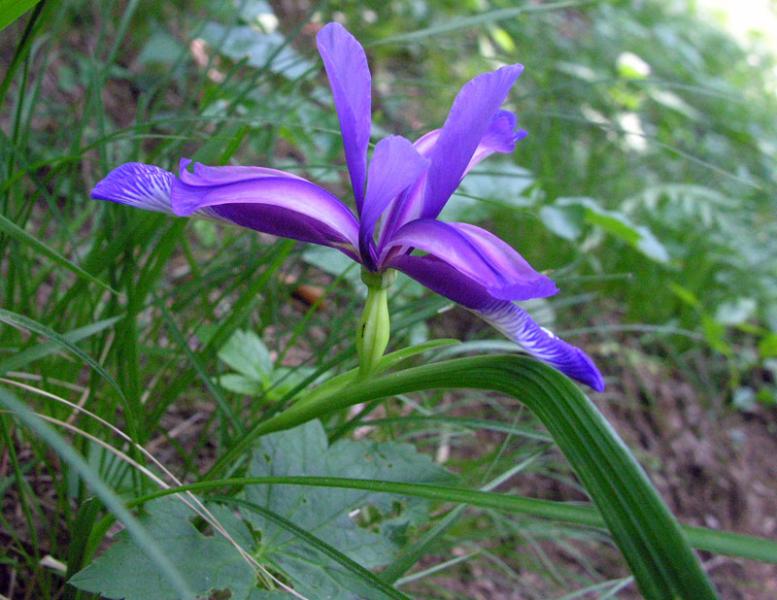
Where did it go? I was pretty sure that I had planted it somewhere near the birches and the birdbath, in the area that we're planning to overhaul. Clearly I want to get it out, but I couldn't find it.
Diary to the rescue: it seems that we had a number of them, and on 1 November 2009 it seems that I planted them in front of the verandah, to the right of these images (before and after, the latter with pine mulch in the area):

|
|||||||||||||||||||||||

|
|||||||||||||||||||||||
Then on 20 June 2010 I took the one remaining one out and put it, yes, in the area that I had remembered, though it looks as if it's further forward than I thought.
On the other hand, looking at the photo, it seems that we had something similar in the north bed. More diary scouring needed.
|
Slow-germinating tomatoes
|
Topic: gardening | Link here |
In January I received tomato seeds from “Burkes Backyard” [sic] magazine and planted them in a seed raising tray. They're not doing well: out of 40, and after 6 weeks, only 2 have germinated:

|
|||||||||||||||||||||||
What went wrong there? Planted the larger one in a pot. It's too big for the lid of the seed-raising box. Hopefully it will survive.
| Wednesday, 9 March 2011 | Dereel | |
| Top of page | ||
| previous day | ||
| next day | ||
| last day |
|
Measuring 3G network performance
|
Topic: technology | Link here |
It's been nearly 6 years since I started monitoring my network connection, first ADSL, then satellite and now 3G wireless. In the course of time, the primitive nature of the interfaces meant that I collected less and less information about the state of the connection. But now that I've more or less accepted that I will have to use a separate FreeBSD machine as a network gateway, I can start to change that.
In particular, I'm interested in signal strength, something of which I don't have much here. The wireless link is now working better than before, and I've changed back to the E1762 modem. How does it compare? When I got the E169, it seemed to have a slightly higher RSSI than the E1762, but things bounce around a lot.
There's already software to do this kind of measurement, the port e169-stats in the Ports Collection, written by none other than Edwin Groothuis. I've been using it for a while, but it's aimed more at interactive display rather than logging. Spent some time today playing around with it to log the following information:
That's clearly not meant for human consumption, but it's just what I need for maintaining graphs. In particular, connection-mode shows the operation mode of the modem:
So the 6 in the example above shows that it's running in HSPA mode, and the 7 is the RSSI. The last four are total data transmitted, total data received, and incremental values. Now to tackle gnuplot to show the things graphically.
And the results? Too early to be sure, but it's clear that the RSSI fluctuates. To be monitored. I'm still working on the program, so I won't publish it yet.
|
Weather makes the plants sick
|
Topic: gardening | Link here |
The unseasonally moist weather continues. It has certainly resulted in a lot more growth than in previous years, but the weeds are also particularly virulent. Only a week or two ago I pulled all the weeds out of this part of the north bed:

|
|||||||||||||||||||||||
The plants growing up the south side of the verandah are also looking less than happy. They've been attacked by aphids and white fly, and I've also found significant quantities of Black spot on some of the roses:

|
|||||||||||||||||||||||
I still don't know what's wrong with the Pelargonium “rhodo”, but it's looking little happier than it was when we transplanted it nearly 6 weeks ago:

|
|||||||||||||||||||||||

|
|||||||||||||||||||||||
And some of the petunias are dying off for no obvious reason. The one at the bottom of this photo, now barely recognizable, was once the most vigorous:

|
|||||||||||||||||||||||
|
Olympus or Nikon?
|
Topic: photography, opinion | Link here |
I've been thinking about a potential change from the Olympus E-30 to Nikon D7000, mainly based on a comparison of the sensor characteristics. That's not the only criterion, though, and I've since looked through Popular Photography's test reports, incidentally a site that greatly benefits from a Google search: their own indexing is impossibly bad.
One of the other sensor qualities is noise, of course. You'd expect that the Nikon, with its top sensitivity of “25,600” ISO (25000/45°) would be better in this department, but not according to the measurements of the Olympus and the Nikon. Despite a considerably larger pixel size, the noise ratings are higher across the sensitivity range. It also doesn't have a swivelling monitor, something I find particularly useful about the E-30. It's probably time to set up a wish list for what I want in a camera.
| Thursday, 10 March 2011 | Dereel | Images for 10 March 2011 |
| Top of page | ||
| previous day | ||
| next day | ||
| last day |
|
Spreadsheets: the computer interface for illiterates
|
Topic: technology, opinion | Link here |
I've been having some discussions with Peter O'Connell, my investment adviser, about the form in which my financial portfolio information is presented. A month or two ago I was confronted with a missing $60,000 or so, and I asked him to investigate. The results seem to show no irregularity, just a serious misunderstanding of the data presented.
This concern isn't new; I discussed it with Peter over two years ago. But this is the first time it has got to the point that I have to do something to gain an overview. Peter sent me a report last month, but once again it didn't really show more than individual transactions. Where's the overview? I asked him to send me the raw data, and I received the date preformatted for Microsoft “Excel”. On request, I also got the data in CSV format.
Today I've got far enough in understanding how to handle the data to be able to import it into a database. Despite Oracle's takeover of MySQL, the manuals are still available online, and I was able to find both a reference manual entry and a tutorial (delivered by email in PDF format) telling me how to do it.
Yes, it's possible, but extremely irritating. There's no direct interface to the “Excel” files; as I suspected, it first needed to be exported in CSV format. But any form of import implies a relationship between the spreadsheet and a database table. At least part of the problem was that you can write anything you want into a spreadsheet, and people do. Looking at what I received, I found four columns:

|
|
||||||||
Why are the dates in German? And why is the year only two digits, but all days are also two digits, even when the first is 0? Microsoft, I suppose. More importantly, what are the columns? For that I need to look at the start:

|
|
||||||||
No headings, just an unrelated entry with a different date format and two numbers. So that part of the date format is not Microsoft after all, it's a (probably not deliberate) decision of the user. Further investigation showed further anomalies:

|
|
||||||||

|
|
||||||||
This spreadsheet purports to show cash funds. Yes, I have money with Central Victorian Investments and Colonial First State, but AFIC and Telstra aren't money funds. And what's the blue-grey box in the middle?
Clearly this isn't the form in which the portfolio information is stored. Somebody has probably gone to a lot of trouble to create this “document”. And it's broken beyond belief. Presumably they just don't have the tools to do it correctly, so they send somebody to do the whole thing manually, even if with a computer as partial aid. And the results are probably even less accurate than writing it on the back of an envelope; at least there you wouldn't get unrelated data popping up outside the area you thought you had. And without a heading, it's not clear what the *** against Telstra or the second value against AFIC mean.
Tried importing the data to make it more malleable, but ran into serious problems with the date representations. And at the end I don't know whether to trust the data or not. So it's useless.
It would be easy to say that Peter's company is just not in a position to do the job, and at a certain level that's true. But they're one of the leading accountancy firms in Ballarat, and I've seen this kind of issue repeatedly with other companies. Basically, they're all computer illiterate, and their performance suffers greatly as a result. I don't think that I'd do any better by changing to a new company.
And toy tools like spreadsheets add to the problem. Spreadsheets probably have a value as a presentation tool, but they tend to get used for purposes for which they're not suited, and the interface probably makes them less useful as a presentation tool than they might be. Much of this is influenced by this attitude, promoted by Microsoft and others, that it's the code and not the data that is important. Nonsense!
|
Try before you buy
|
Topic: photography | Link here |
I haven't made much progress on investigating a switch to Nikon, but it's clear that it's better to try things out than buy and then be disappointed. That's particularly so in view of the fact that I would have to replace a camera body, four lenses and a flash unit, costing several thousand dollars. So today I went looking. I'd almost think that it would be worthwhile opening up a camera hire service myself. I can hire one from michaels Camera in Melbourne for $50 a day, or only $22 a day for 4 weeks—a total of $616, rather more than half the price of the camera. Admittedly, there are cheaper offers, but not much.
Ideally I should find somebody who has a D7000 and swap my Olympus E-30 with him for a day or two, but that's not easy to do. Maybe I should just buy one and try to sell it on eBay. But before I do that, there's more investigation to be done.
|
Network signal strength, caught in the act
|
Topic: technology | Link here |
The network monitoring software has been running well for over a day now. I've played around with the reporting format a bit, but it's basically the same. And the signal strength reports match the odd incidents I've seen, where the reported strength changes dramatically for no obvious reason:
The fifth column is RSSI. It hovers round 6 to 8 nearly all the time, but at 16:08:29 it's reported as 16. RSSI is measured in steps of 2 dB, so this is 20 dB or 100 times as strong, just briefly. I can't believe that; there's definitely something wrong in the modem firmware. There was no dropout or other obvious effect in the connection.
|
Good bye American Express
|
Topic: general | Link here |
When I had my trouble with American Express two years ago, I didn't bother to cancel the card because it didn't seem to have any advantage. But now that they have told me that they will deduct $80 from my bank account, I have to react, so sent a letter to the purported author of the letter, person to person, asking for explanations. I might not have done person-to-person if I had known how much it costs, but it should be fun to see what kind of reply I get, if any.
| Friday, 11 March 2011 | Dereel | Images for 11 March 2011 |
| Top of page | ||
| previous day | ||
| next day | ||
| last day |
|
Wikipedia markup pain
|
Topic: technology, opinion | Link here |
Spent some time doing some minor touch-ups on a couple of Wikipedia pages today. Nothing important, but it took hours! I suppose it's a question of the tools available. One-line-per-paragraph has never worked for me, and editing a web form reminds me of an IBM 029.
There are two (or maybe three) ways of editing text for markup:
Use an editor, explicit markup. This is the traditional way that we've always used; as far back as 1973 I had written documentation for UNIVAC like that:
This markup language gave a special significance to column 1 (remember, punched cards, though UNIVAC 1710 and not IBM 029), and pretty much repeated the rest verbatim. That's not very sophisticated, but it worked. Decades later, I do the same for some of my web pages, and even the sources for “The Complete FreeBSD” (written in groff) don't look that different:
Here again column 1 has special significance (certain characters, such as a period, are magic), but it has many more features. And of course now I have an interactive text editor and can work on it much more easily than in the punch card days. But the principle remains the same.
I can do it the WYSIWYG way, where I don't see the direct markup at all; all I see is how it renders on my display. In general I have no record of how I have achieved this display, and I have no idea how it will render on somebody else's display. From time to time I come across the results of other people's problems in this area and comment on them. Typically they have changed fonts in mid-word, but the display isn't clear enough to show the problem to them. I've expressed my disgust at this toy approach many times in the past.
The Wikipedia approach is certainly a reaction to bloated markup languages and WYSIWYG. It tries to be as simple as possible (though mercifully not as simple as the UNIVAC program). And maybe it's too simple. There's at least one page with a behemoth table where I have just given up trying to simplify it. It's too painful. Probably the fact that it's the way it is is that others, too, have given up trying to fix it.
Part of the problem is undeniably the fact that web browser input windows are not exactly the cutting edge of text editors. With a bit of encouragement you can convince firefox to use at least some Emacs bindings.
But it's still painful. The functionality is only a small fraction of what you'd expect from a text editor. Why not a real text editor? Yes, you can do that, with a firefox plugin (in this case, read: workaround for missing basic functionality) called “It's all text”, which will connect to an editor of your choice. But that's still not enough. Then you end up with text like:
The problem here, at least for me, is that the entire paragraph is on a single line. It makes it an order of magnitude more difficult to read than the first example, where the line length is relatively limited—for me, at any rate. Is this a matter of tools? Should I find an Emacs line wrap mode, which displays text legibly but then removes the line breaks before saving? I don't know. But it does mean that it takes me about 5 times as long to edit this kind of document.
Is this just me, or a general problem? I suspect the latter, because people don't really use keyboards any more. Others don't notice the problem, because they've never seen the better alternatives. But how do you explain?
|
Another mystery solved
|
Topic: gardening | Link here |
Mail from Laurel Gordon today: mystery plant 27 is a Mirabilis jalapa, a Peruvian plant (again!) named after a Mexican city. It's perennial and likes full sun, so we can now do something with it (and bury any concerns about it losing its leaves).
|
Combatting the weeds
|
Topic: gardening | Link here |
The weather is warmer again—I get the impression that some plants think that the summer is really just starting—so out to spray weeds. I wonder how well it will work. This year I think I'll have to admit that the weeds have won.
| Saturday, 12 March 2011 | Dereel | Images for 12 March 2011 |
| Top of page | ||
| previous day | ||
| next day | ||
| last day |
|
House photos at dawn
|
Topic: photography | Link here |
Andy Snow (I think) suggested recently that I should take my house photos at dawn because the contrast is less extreme:
OK, I hadn't tried these photos at dawn, so I thought that was an idea worth treating. But a couple of days later, Andy was no longer so sure:
But that didn't happen, so I started just before sunrise at 7:26. There was the significant advantage, as nearly always at this time of the morning, that there was no wind, greatly simplifying the HDR stitching. The first image was the complicated one to the south-east of the verandah. Here are photos taken on 29 January 2011, 5 February 2011 and today:

|
|||||||||||||||||||||||

|
|||||||||||||||||||||||

|
|||||||||||||||||||||||
The first one was taken in full sun, and the effect on the left hand side of the image is clear, in particular the bird bath. The second was taken about an hour after sunrise on an overcast day. I personally think it looks the best. Today's photo is more subdued. It's also less colourful and the colour is out of balance, something that I should have fixed.
As time went on, of course, the sun rose. Less than 20 minutes later things looked very different (same three dates):

|
|||||||||||||||||||||||

|
|||||||||||||||||||||||

|
|||||||||||||||||||||||
Fixing the white balance in the bottom photo would require a lot of work, more than I'm prepared to do, and even then it wouldn't be good. Again I think the middle photo looks best. So I think I can give up on the dawn photos: the others looked similar.
On an unrelated note, I'm still adjusting my camera position to eliminate parallax. Today's full verandah panorama was taken with the camera set back 7.5 cm on my rail. It still isn't perfect, but it could be the best so far. Next week I'll try 7.6 cm.

|
|||||||||||||||||||||||
|
Ballarat Begonia Festival
|
Topic: gardening | Link here |
Today was the first day of the Ballarat Begonia Festival, and in to town to take a look. First took a look on the web site. In the last couple of days they had produced a PDF of the official programme—and, for the first time, the information that they charge admission to the exhibition. It's free for members of the Friends of the Ballarat Botanical Gardens, which I'd been thinking of joining, so quickly printed out a membership application form and filled it out.
Getting there was more complicated than I thought, and it took longer. We had to park about 1 km from the event, and by the time we got there, we had just passed the start time for the first event, the Curator's Garden Tour, But of course it started a little late. As the time (20 minutes) suggested, it was a little light on detail. That's a pity; they could easily have made two hours out of it.
Nevertheless, a little late back for the “How to grow Begonias” talk. I could have done without that, though; it was even lighter on detail than the Curator's walk. About the only thing I learnt (later, from the speaker) is that there's no point trying any propagation activity now, because the tubers are about to become dormant. So I should wait until November.
At the ticket sales, got pointed to the direction of the Friends of the Ballarat Botanical Gardens (I must find an abbreviation for that; “Friends” by itself sounds too ambiguous) and was told to look for somebody called Rodney. Nobody knew Rodney, but finally we found the club house (George Longley Building) and John Garner, who was happy to sign me up, but who didn't have a stamp to put on the receipt. Back to the ticket office, where they apparently didn't know that I got free entry as a member, but were prepared to take my word for it.
The exhibition itself was packed; we could hardly move. And it was a little one-sided, with big hanging tuberous begonias and even bigger standing ones:

|
|||||||||||||||||||||||

|
|||||||||||||||||||||||

|
|||||||||||||||||||||||
The overall effect was overwhelming, and we didn't stay long. It would have been even shorter, except that by complete coincidence I saw not one, but two people next to me (unrelated), both of whom had Olympus DSLRs: a woman with an E-520 and a man with an E-30 (my model). That's just about the first time I've met anybody with an Olympus DSLR by chance. Spent a little time comparing notes, but nothing of real interest. The wife of the man with the E-30 had a Nikon D3100, which is really a lot smaller and lighter than the E-30. But then, so is the E-520.
Another issue is that the display was almost only tuberous begonias. In particular, I didn't see a single rex begonia. I can live with that, but I suspect that Yvonne would have liked them.
After that round to the George Longley building, where they have lots of plants on sale. That's nothing to do with the festival: it's a permanent fixture, the parent of the display bought in front of the Robert Clark Centre where we have bought plants in the past. Bought a number of plants:
A Salvia leucantha with violet flowers:

|
|||||||||||||||||||||||

|
|||||||||||||||||||||||
A Polemonium of unspecified species:

|
|||||||||||||||||||||||
A Fuchsia triphylla, the plant I thought I had bought when I bought the Mirabilis jalapa (first photo):

|
|||||||||||||||||||||||

|
|||||||||||||||||||||||

|
|||||||||||||||||||||||
They're not that dissimilar, so I'm no longer as unhappy that I misjudged the Mirabilis jalapa when I bought them.
A Loropetalum chinense, with pretty white flowers reminiscent of the Corydalis that we bought last October (first image):

|
|||||||||||||||||||||||

|
|||||||||||||||||||||||

|
|||||||||||||||||||||||
Yvonne had planned to use it as a ground cover. The label said “2 m”, but she had assumed that that was the spread. A check in Wikipedia, showed that yes, indeed, this is a small Loropetalum. Other species grow 12 to 13 metres tall, and this one only grows to 3.7 m (presumably really 3.6576 m or 12 Imperial Feet). We'll have to think of somewhere else to put that.
Another Rosa banksiae to replace the one that we got as a cutting at the end of October, and which didn't strike. I wonder why they all look so straggly.

|
|||||||||||||||||||||||
By being a member, I saved $6 (20%) on that; along with the $4 savings in entry to the exhibition, I have already saved the $10 that I had paid for membership.
|
Time for a new disk
|
Topic: photography, technology | Link here |
All the photography today came at a price: my photo disk is full. It's a good thing that there are 2 TB disks out there, but at the rate I'm going, I'm going to need more than one disk for all the photos.
| Sunday, 13 March 2011 | Dereel | Images for 13 March 2011 |
| Top of page | ||
| previous day | ||
| next day | ||
| last day |
|
Restructuring file systems
|
Topic: technology | Link here |
So my /src file system is full—of photos. I had put them on /src, which is nominally 1 TB, but really:
When I started, I had about 130 GB of photos, collected over decades. Now there are about 650 GB, and clearly they make up the bulk of the storage. Time to split into two disks, and because it's easier to leave the photos where they are and move the rest, that's what I did, to an external USB 500 MB drive that I happened to have spare.
Once again, it took all day. It seems that you can't get much more than 10 MB/s through a USB interface, and this is the kind of situation where it shows. And that wasn't the only problem: while copying, I saw lots of this fly past in the log window:
Not good at all. Strangely, the system didn't crash, and of course tar told me some time later that some files hadn't been copied, so this time used rsync and discovered yes, indeed, a lot of files hadn't been copied. I wonder how much I can rely on this disk. Maybe I should just install a new disk in the machine and start again.
|
More diary layout changes
|
Topic: technology, opinion | Link here |
I've been playing around with linking to individual diary items for some time. If, for example, I want to refer to an older entry, I put a named anchor there and link to it, as in the first link in this text (from the beginning of the month):
A while back I tried to get a WiMAX Internet connection from Aussie Broadband, but was told that I wasn't in range because of terrain issues. That looks unlikely, and today I decided to try a little harder.
For my own use, I then added a local hack that would produce a self-referential link to that item:
SkyMesh solves satellite problems
It didn't seem to make much sense to do that for external use, so I didn't. Then Peter Jeremy came and told me he had wanted to refer to my recent comments on Wikipedia markup, and he couldn't find a link. That's correct: there wasn't one. So set to to create links anyway, which wasn't too much work, and also added a Javascript popup to explain what to do, and then discussed it.
Peter was happy enough, but Callum Gibson thought that there should be a separate “link to this topic” button. I need to think about that; it's probably a better idea than the rather confusing link, but I'm not sure I like that either.
That transitioned into a discussion of layout in general My current diary layout has text of 70 characters, which, as Callum Gibson puts it, is “not how the world of web works”. Indeed, but what do I care? You can't throw away centuries of well-researched knowledge just because of a new medium. In particular, the 70 character limit is there because of the human eye, which hasn't (yet) changed. So that part of the layout is non-negotiable.
That doesn't mean that I don't use the rest of the page. Computer output and photos are allowed to go full width where appropriate, which makes sense to me. The headings are also full width, which is arguably wrong:
Tuesday, 1 March 2011 Dereel Images for 1 March 2011 Top of page next day last day Network woes: Give me WiMAX
A while back I tried to get a WiMAX Internet connection from Aussie Broadband, but was told that I wasn't in range because of terrain issues. That looks unlikely, and today I decided to try a little harder.
Probably I'll change that. In the process, I should put the title and the topic on the same line.
|
More fungus
|
Topic: gardening | Link here |
Attending to the petunias in the hanging baskets today, and found one of them had serious mildew issues. I've never seen that before. Dragged out some Yates Fungus Fighter Copper Fungicide (yes, that's what they call it) and mixed it up. The instructions call for 2 g or 3 g per litre, and there's a handy spoon there which, they say, holds 3 g when level. I have a balance, so I used that instead, and in the process discovered that the spoon holds 7.5 g when level. That's a long way off even for spoons: after all, this one is custom made.
| Monday, 14 March 2011 | Dereel | Images for 14 March 2011 |
| Top of page | ||
| previous day | ||
| next day | ||
| last day |
|
System upgrade: time for action
|
Topic: technology | Link here |
As I came into the office this morning, Yvonne gave me the somewhat garbled news that Dereel was not there. It proved that what she meant was that booting her machine hung on NFS mounts of dereel.lemis.com. And with good reason: it had been down since 1:23. No messages in the log file; I suspect this is a consequence of the USB backup yesterday.
That's ridiculous. I've been delaying upgrading dereel for over 6 months. The idea is the relatively low priority desire to “get it right” rather than to “do it now”. But I think now's the time to do it. First, though, I spent some time upgrading the hardware: I used to have this machine hidden behind all the monitors where I couldn't get at it, so it didn't have a DVD drive. It's still behind the monitors, but on the other side of the desk, where I can get to it, so it was time to put one in. While doing that, to my surprise, I discovered an unconnected 1 TB disk drive in the cabinet. The reason was obvious: it was the third SATA disk, and the power supply only had two SATA power connectors, so I first had to change the power supply.
Then built a new kernel and started upgrading ports. On Jürgen Lock's recommendation I installed portmaster, which I haven't used before. After a bit of searching, found some documentation in the FreeBSD handbook. It looks like it might be useful, though it ran into some strange issues with corrupt Makefiles and stopped completely: of about 850 ports that I built six weeks ago, 227 needed to be updated. Finally tidied up the Makefiles and let it work its way through that, which took the rest of the day.
|
Car problems
|
Topic: general | Link here |
Yvonne's car (a Holden Commodore) has suddenly developed a scratching noise from the right front wheel. It seems to be suspension related: it gets louder when the springs compress, and almost goes away when they expand. But there's nothing obvious except that the suspension seems to be down by about 1 cm on that side:

|
|||||||||||||||||||||||

|
|||||||||||||||||||||||
Apart from that, nothing obvious. Was going to call Paul Sperber at the garage, but discovered that today was a public holiday (“Labour day”). Tomorrow.
|
Old as the hills
|
Topic: general, technology | Link here |
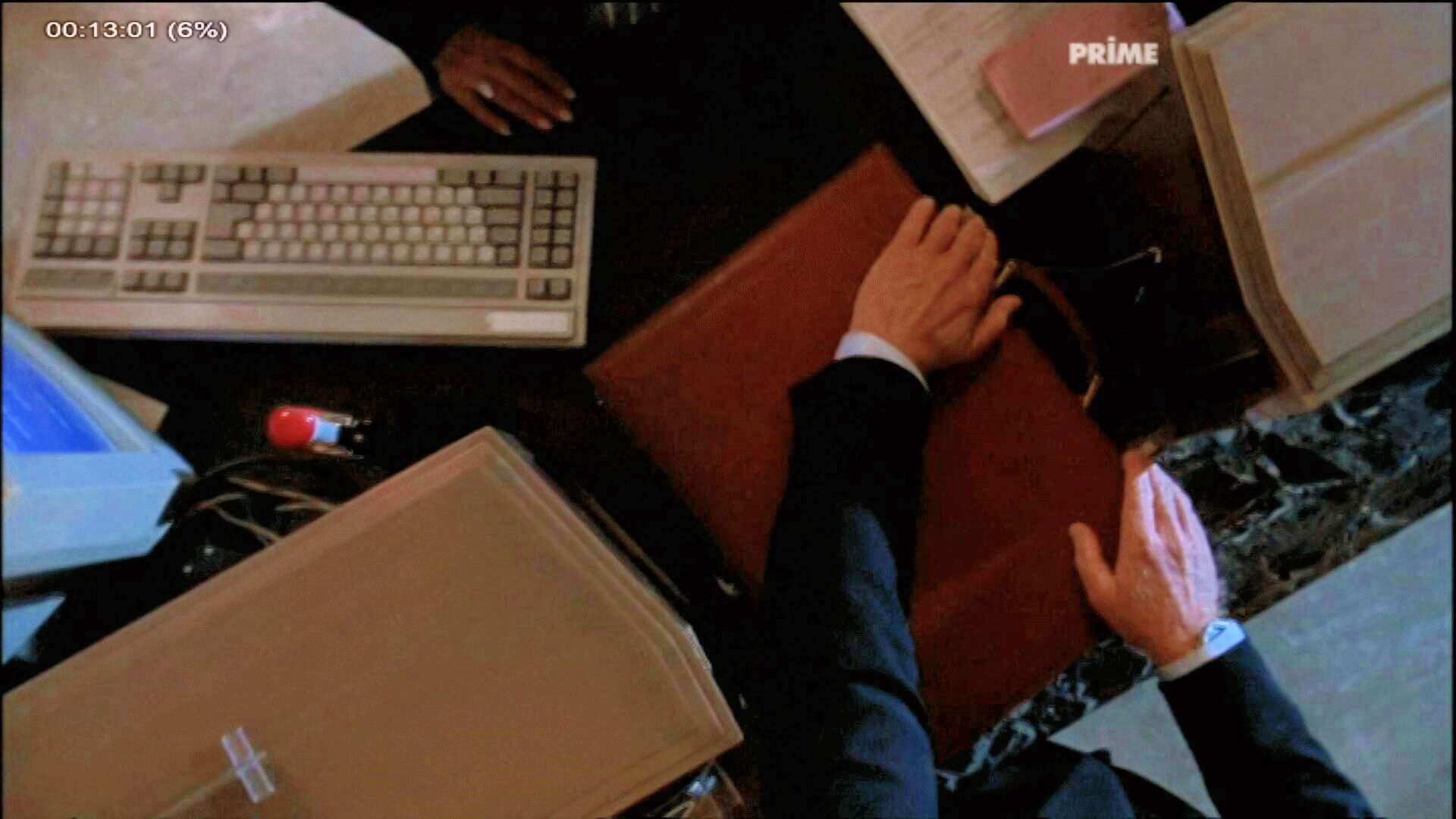
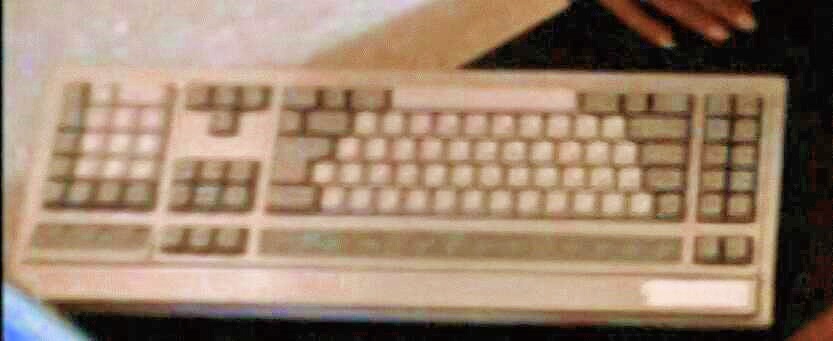
Started watching Sneakers, a computer-related thriller released in 1992, on TV this evening. It wasn't spectacular, and we postponed it for Some Other Time. As usual, the computer equipment brings home to me how much times have changed. With one exception:
|
|||||||||||||||||||||||
|
|||||||||||||||||||||||
That's a Northgate OmniKey keyboard, the same as I still wish I were using. I have a couple which need repair, and in the meantime I'm using an Avant Stellar, which looks pretty much the same, but which has serious firmware issues. Sometimes I feel even older than usual.
|
Little garden work
|
Topic: gardening | Link here |
Had meant to do some work in the garden, and got as far as planting the Salvia leucantha to the north of the shade area. Then I needed to put in a dripper for it, and couldn't find any, and so gave up.
| Tuesday, 15 March 2011 | Dereel | |
| Top of page | ||
| previous day | ||
| next day | ||
| last day |
|
Optus 3G: We don't want to fix your network problems
|
Topic: technology | Link here |
My network connection has been relatively stable for the last week, until this morning, when I had two dropouts of 12 and 4 minutes respectively. The connection didn't drop, and the signal strength was constant:
This is the first time I've had the modem monitoring program running in parallel. It shows surprising information:
The interesting thing here is the RSSI, 8, which corresponds to two bars on the toy displays. But wait! There's more! Despite the fact that I couldn't contact any system at all, I was transferring data! In the minute to 7:31:22 I received no less than 510 kB of data, an average link speed of 68 kb/s. That's not spectacular, but it's in no way related to the complete lack of connectivity that my other script shows. What's going on here? The throughput dropped dramatically immediately afterwards, and then came good again at 7:46, round the time the general connectivity resumed, so I'm guessing the drop was due to the same cause as the lack of connectivity. Maybe Optus drops ICMP traffic preferentially when they're overcongested.
By coincidence (I think), got a call from Lachlan at Internode Support today, with the news that Optus have determined that the problems are related to my location, and they are not going to do anything about it. They don't state the relationship; this sounds very much like a way of packaging “This is too difficult, let's not bother”.
The problem is, Internode don't intend to do anything about it either. There's no explanation, but it seems now that I have the choice of another provider or putting up with it. No further support will be offered. It's not clear how much influence Internode has on the matter, but clearly that's unacceptable. If they can't provide support, they shouldn't be providing the service. And I'm in the same situation as I was 3½ years ago: marginal network connectivity only 100 km from Melbourne (or “out in the bush”, as Lachlan put it). What do I do now? Make a fuss, I suppose.
|
Ports upgrade, continued
|
Topic: technology | Link here |
On with the ports build today, hampered somewhat by portmaster's insistence that I take notice of warnings:
What's the purpose of that? Yes, we know about the stupidity of the jdk license agreement, and yes there's nothing that portmaster can do about it, but all this does is require even more attention during the build. Played around with the options to try to silence it, and came up with the following invocation. Unfortunately, it didn't work, so I've struck it through to stop people, including myself, from trying to use it again:
The problem was that the --clean-distfiles and --clean-packages override the other options, and after cleaning, portmaster just stops. So now my invocation is:
Unfortunately, even that doesn't stop it from stopping on every warning. But finally I got round to starting the build of the updated ports, which ran all day, not without further surprises:
What was that? I saw no I/O error logged, and the end of this output was in the log file as well. Looks like some NFS glitch. That shouldn't have happened without being logged.
|
ABC drops Real Audio
|
Topic: music, technology | Link here |
On Saturday mornings, ABC Classic FM radio broadcasts a programme Keys to Music, which I find quite interesting. It's difficult to find time to listen to it when it's broadcast, but they conveniently have web feeds of the last month's programmes on the web, and I've been downloading them. But recently that hasn't worked: the server for the RealPlayer version doesn't respond. I've tried the “Windows” Media Player version, but it's very jerky, and I can't find a way to store it.
This has been going on for weeks now, and others have confirmed it: no response from the server. Today I called up and got connected with Stuart Hale, who promised to look at it. Am I really the first person to report the problem? He also told me that they were phasing out RealPlayer support, though that shouldn't affect the current problem. It seems that now you need Microsoft to access the ABC. I suppose I should put in a complaint.
|
Visiting friends
|
Topic: gardening | Link here |
Finally got round to potting some of the Hebes that have popped up in the Japanese Garden, and took them off to the Friends of the Ballarat Botanical Gardens , who meet on Tuesday afternoon and pot(ter) around. They have quite an interesting collection of books, including one about the weeds of South-Eastern Australia which seems to contain just about every plant that we have in the garden, notably including the Lilium formosanum that I bought here last month. Many others, but I didn't get much of a chance to read them: lots of people came up to me and told me about the organization and activities. It looks like I might get involved with the History Group getting things put on the web, but much depends on whether I have to use Microsoft tools.
|
More is less
|
Topic: general | Link here |
On the way home, stopped into Gays to buy some glue to attach the rubber profile strips to the greenhouse. After some discussion, settled on Liquid Nails, which came in 100 g tubes and 320 g press-out cylinders, the kind that require an attachment to squeeze out. 100 g is plenty enough for me, but the salesman suggested I took the other. Then I saw the prices: the 100 g tube cost about $8.50, and the 320 g cylinder cost $3.95. You have to marvel at the discrepancies of modern pricing.
|
Another crash
|
Topic: technology | Link here |
In the evening, came in and discovered that dereel had failed again, this time with no help from USB storage. I recalled seeing an error message from the new 1 TB disk, but later I couldn't find any reference in the log files. Did I dream it?
| Wednesday, 16 March 2011 | Dereel | |
| Top of page | ||
| previous day | ||
| next day | ||
| last day |
|
More diary format updates
|
Topic: technology, general | Link here |
As planned, gave a bit more thought to the layout of my diary headers (and not the headers of the RSS feed) today. I've accepted the fact that at least the topic headings should be no wider than the text block, and I want three things on them: title, topic descriptions and a link to the article:
And yes, of course this is currently identical to the real header, but the real header may change, and this one won't. And immediately there's a problem: at least on my display, the text is too long to fit on a single line, and the topic description folds over two lines. But that's only part of the issue: I have to decide in advance how much space to allocate to each part of the heading. In general, the title is the longest, and the link is the shortest. But I can't allocate only 10% for the link, or the topic description, already offset, would slide even further to the right.
How I hate HTML and CSS! They seem to do everything to make things difficult. They still think mainly in pixels, which should be banned, and only some elements allow specification of sizes in terms of the text size. Even this layout required several attempts before I found a combination of HTML tags, attributes and CSS that would allow me to specify the sizes in terms of character sizes (em) and to ensure that the table was exactly the width of the text (so the “Link here” link is right-justified). And despite that, it displays differently for different people: I can specify the title text as a little larger, and I tried between 1em and 1.4em, but the browser still has to choose a font size, and that was different for me and each of my testers, Callum Gibson and Peter Jeremy. I currently have it at 1.2em, and that seems to be an acceptable compromise. But what a pain it all is!
|
Port updates, day 4
|
Topic: technology | Link here |
On with the port updates. This is taking nearly as long as building them in the first place. Today ran into a problem I hadn't seen before:
That looks like a problem with locking over NFS. So back to check out the ports tree on cojones, which only has a 15 GB disk. Hopefully it won't overflow. In the process, found a few more that had been updated since I started. I suppose when I finally finish the update (can I hope tomorrow?) I can start all over again.
|
Converting Microsoft Media Player to MP3
|
Topic: music, technology | Link here |
Still no response from ABC Classic FM radio about their server breakage, so set to trying to convert the alternative streams to MP3. It seems that mplayer understands it, and with the following invocation I was able to dump the programme to disk:
It happily dumped an enormous PCM file to disk:
So far so good. While it was downloading, I was able to use another instance of mplayer to listen to it and confirm that the data was good. But then it continued:
And that was all. Not only did it only convert 36 seconds' worth, it overwrote the original file. In such cases I tend to make a link to a second file name, so that when the first is deleted, I still have the original. That works in the normal case where a program processes a file, produces a new file as output, removes the old file and renames the new one. But that's not what mplayer does: it writes back to the same file it's processing, which presumably works because the new one is much smaller.
Tried again with a different invocation:
That at least gave me the stream. Now to work out how to convert it to MP3.
|
Reception problems: caught in the act
|
Topic: multimedia | Link here |
My TV reception has been deteriorating again. In the past I've gradually come to the conclusion that it was something to do with the antenna connector, but I didn't have any conclusive proof. Today the reception was completely unacceptable. While recording a programme, removed and replaced the antenna connector (the one with the power supply for the “masthead” amplifier), and things came good. That's so conclusive a difference that it can really only be the connector. Now how do I fix it so that I don't have to keep messing with it every week?
|
First response from American Express
|
Topic: general | Link here |
Call from a Fausto at American express in response to my letter to them last week. It seems that I can keep the card and not pay the $80; I just get half the number of reward points. That's not the point for me; on the contrary, it just adds to my suspicion. The letter did mention that the $80 was for the rewards programme, but not that it was optional, and that I could participate in the programme even if I didn't pay the sum. Asked him to send me a written reply to the letter, to which he agreed.
|
More winter tomatoes
|
Topic: gardening | Link here |
Of the 40 “winter” tomato seeds I planted over 6 weeks ago, only two have germinated. I don't expect any more, so I've put in the rest of the seeds—nearly 30, as it turns out—and I'll keep them a bit warmer. Maybe something will come of it.
| Thursday, 17 March 2011 | Dereel | Images for 17 March 2011 |
| Top of page | ||
| previous day | ||
| next day | ||
| last day |
|
System upgrade: nearly there
|
Topic: technology | Link here |
I have finally finished updating the ports on cojones! And, as I suspected, I could start all over again, though I only got one new update. And then a new kernel, copy to the alternate root partition on dereel, and I'm ready for the next step of the adventure. I'm gradually coming to the conclusion that I made the wrong decision all those years ago when I decided to keep the configuration files in RCS. I'm still fiddling with the scripts, and this kind of script has the potential to do untold damage if it's used incorrectly, or if there's a bug. But I'll do all that tomorrow.
|
Commodore problem fixed
|
Topic: general | Link here |
The Commodore is due in for service tomorrow to find the cause of the scratching. That means driving it 30 km, of course, so anything I can do to alleviate the problem is of advantage. Decided to take the wheel off and look inside. But I couldn't fit the jack: this file was hanging out of the underside of the car and blocking access to the jack pad:

|
|||||||||||||||||||||||
That was the cause of the scratching, of course. It must have been lying on the road, and Yvonne drove over it, throwing it up into the floor. So we don't need that much work done, though it's probably a good idea to get the car up on a hoist and see if any serious damage has been done to the floor.
|
Upgrading the shade area
|
Topic: gardening | Link here |
We haven't really done much with the shade area that we set up a few months ago. I transplanted a Fuchsia there last August early on, and it grew happily, but the rest is mainly garden bed with lots of ground cover and a somewhat lost-looking Hosta that we put in a couple of months later. But there was a large amount of gravel in the front:

|
|||||||||||||||||||||||
Decided to fill the gravel area in and plant the hosta there (later), and also two more Fuchsias: the Fuchsia triphylla we bought on Saturday, and another that has been languishing in the dark to the north of the drive. And then we'll have space for the tree fern roughly where the hosta is at the moment. Filled in a lot of soil (really the composted Carpobrotus that we removed last July):

|
|||||||||||||||||||||||
Then tried to plant the fuchsia. No go: there's a concrete slab under most the gravel. I recall that now; that's why we put the right-hand post further the right. What to do? I only have about 15 cm of soil. How deep are fuchsia root systems? This is a small plant, so maybe it won't worry about it. Planted it there anyway. We'll see how it does, and we can always move it again if it's not happy. The Agapanthus at the left of the photo is just to mark the position of where we may put the other fuchsia later.

|
|||||||||||||||||||||||
| Friday, 18 March 2011 | Dereel | Images for 18 March 2011 |
| Top of page | ||
| previous day | ||
| next day | ||
| last day |
|
System upgrade: taking the plunge
|
Topic: technology | Link here |
I've been dragging my heels about updating my main system, dereel.lemis.com, for over 6 months now. I've been preferring to do it right rather than do it fast, and in this case it meant perfecting the system upgrade instructions I've been working on for over 7 years now, and it's still not finished.
And I think it'll stay that way. It seemed like a good idea at the time, and also for some time afterwards: find a clear, clean way to upgrade the system with minimum intervention, and the ability to return quickly to the old system if something went wrong. But today I've decided that it doesn't solve the problems. On the contrary, doing a big upgrade just means a lot of pain at once.
I'll go into the blame game later, when the system is up and running smoothly. Certainly I'm partly to blame (some people I know will say that only I am to blame). But it's worth noting what happened; maybe it will stop other people running into the same problems.
My method is to have two root file systems, including /usr. That way I can boot from either of them, thus quickly returning to the old status if something goes wrong. I check in all configuration files to RCS, which has proven not to the best choice, and then check them out in the new system.
One problem is clearly /etc: many configuration files change between releases, so there's a fair amount of work to do to get things working again. This would happen in any case. In my case, I had the following files to merge:
Keep aliases, crontab (after comparison), newsyslog.conf, ntp.conf and printcap.
Merge contents of syslog.conf, including removing some really old cruft:
Add my modifications to devd.conf:
Update inetd.conf for the packages that I had installed (popper, samba and rsync), and also ftp. This should really be done on installation of the port, I suppose, but that requires manual intervention.
Tidy up group, which has a number of new group members. Irritatingly, a number of group numbers have changed, which could cause numerous subtle and hard-to-find permission problems if the old group is carried over.
Merge master.passwd, which in my case contained amazingly old entries:
To judge by the addresses, both of those must have come in there in 1998 or so.
Also found a number of duplicate entries, so I've now sorted the entries by user id to make it easier to see. There are a number of gratuitous changes in the new master.passwd:
Changed them all to /usr/sbin/nologin (which is the same file as /sbin/nologin), and then discovered that the new master.passwd used both names anyway.
Then, finally, I could reboot! And I discovered I had forgotten to update /boot/loader.conf to point to the new partition, so first had to do that:
Rebooting the system showed a few more things that I had forgotten: the boot didn't complete because I didn't have a mount point for one of the file systems, and when it completed, I still needed to make a password database:
=== root@dereel (/dev/pts/22) /etc 35 -> pwd_mkdb -p /etc/master.passwd
After that the system came up happily. I was worried about USB devices timing out: previously they would do so at probe time unless I disconnected them. But that's gone now. And X started with no problems at all, another load off my mind. A few minutes after booting I was quite happy with the results. But that was just the lull before the storm.
The first irritation was Emacs, which did start, but not without vomiting a lot of messages onto the starting xterm:
I've seen that before, but I still have no idea what it's supposed to mean. Maybe I should build Emacs without GNOME. But at the moment it works, and I have other issues to address.
Then various programs were no longer there: xearth, which I frobbed decades ago and then lost the source, and kklondike, one of Keith Packard's kgames, which used to be distributed with X decades ago, but which is now no longer there, and the old sources no longer build. So both of those came over from the old system as binaries.
The first things were the background processes that I don't start at boot time. This is partially laziness, partially the issue that they require secure connections (like the mail tunnel to my external server). Starting the mail tunnel and the network statistics process was no issue, but the weather station was a completely different matter. First it came up with library version problems: the programs were written against an old version of libusb. Decided to copy that from the old partition rather than to recompile; then it ran into problems with MySQL:
=== root@dereel (/dev/pts/5) ~ 23 -> mysql
That's a strange thing to see from a completely fresh installation, but just to be on the safe side I removed the package and reinstalled it (shades of Microsoft). That seemed better, but I couldn't access the databases. It seemed like a permission issue, but in fact it was just the location of the database. By default it is /var/db/mysql, but that's on the root file system in my partitioning scheme, so I put it on /home/var/db/mysql. After that, I was able to use mysql, but the weather station software still wasn't happy: it couldn't detect the station. So, finally, I recompiled it, and it worked. And it didn't report any communication errors with the station, like the old version did.
For a while. Then it hung, and I ended up with null readings. It carried on working fine when I stopped and restarted it. Maybe it's just hanging instead of reporting the problem. To be observed.
firefox didn't start either. Of course, it's been installed as /usr/local/bin/firefox3 instead of /usr/local/bin/firefox. It's been that way for a while, but I have put in a link to the base name. When I got it started, noted that it's now much faster rendering big photos. There's still a slight delay, but nothing like the up to 30 seconds the old version used to take. But there's no flash (another problem of mine, of course), and a couple of times I caught it looping. After shooting it down once, it came back with the strange error window:

|
|
||||||||
Tried to click on Details, but nothing happened. After shooting it down and restarting a couple of times, discovered that I first needed to select the user profile in the other window; then Details got me a masterpiece of truncation in a non-resizeable window:

|
|
||||||||

|
|
||||||||
I'm sure that's truncated (at least it doesn't make sense), but the minuscule “scroll bar” showed no more. And I have absolutely no idea what it's supposed to mean. Maybe it's time to start my firefox configuration from scratch again. And then maybe I can get more useful icons than firefox has decided I should have. Instead of nice neutral title bars, I get:

|
|
||||||||
Clearly this is an attempt to try to sell me on using tabs instead.
Trying to access the Internet showed another problem: cojones, the gateway machine that I should really rename, hung on NFS mounts. A bit of investigation showed that nfsd wasn't running on dereel. So to look at the startup files in /etc/rc.d/. I've never been able to find my way around them, but I really didn't want to reboot so soon. Potential candidates are mountd, nfscbd, nfsclient, nfsd, nfsserver, nfsuserd and rpcbind. On the face of it, nfsserver looked the best, but it didn't work. With some playing around, discovered that nfsd at least did the job, and also that the reason for the problem was the lack of an /etc/exports file—how did that not get checked out?
Then tried to access web sites on the Internet: not found. cojones was running alright. But named on dereel wasn't: I had manually checked out the /etc files, but not the files in subdirectories such as (in this case) /etc/named. That was easy enough to fix.
But I still couldn't access local web pages: the web server wasn't running. Attempts to start it failed with a missing file:
=== root@dereel (/dev/pts/8) /home/grog 1 -> apachectl start
That's not a syntax error, of course: at best, it's a semantics error. But where did it come from? Yes, it was there in the old system, but not in the new. It was in the PHP port, of course, but I had forgotten to copy my configuration options to /var/db/ports/php52/options, and it needs the entry:
By default it's not.
Then I was able to start the web server, but it couldn't find anything: for reasons that probably need reviewing, my document root is /usr/local/www/data, and of course that wasn't there. A few tars and symlinks and all was well.
But then I couldn't access my PHP pages. I got an error message “Undefined function: preg_replace”. Why that? PHP is deprecating the POSIX regular expressions in favour of the Perl-compatible ones such as preg_replace. But further investigation shows that the POSIX regular expressions are in the base system, and the Perl-compatible ones are in the extensions ((/usr/ports/php52-extensions), which don't even build them by default. What a pain!
Next was email, which seemed to work more or less. But there was no more incoming mail. Further investigation showed that the crontabs were gone, so there was nothing to fetch the mail. crontab crontab fixed that, and also got the weather and network access graphs going again.
But then spam started pouring in. I've been critical of SpamAssassin in the past, but when spamd isn't running, things are even worse. Running it manually showed a surprising message:
=== root@dereel (/dev/pts/10) /usr/local/etc 63 -> spamd
Further investigation showed: yes, indeed, I needed to run sa-update. SpamAssassin ran OK. So why doesn't the port do the sa-update?
Next was wine, a Microsoft “Windows” compatibility package. It didn't even get started:
=== grog@dereel (/dev/pts/15) ~ 8 -> wine
Further investigation shows that this is a known problem: PR 86207 reports the problem, but claims it's a kernel issue which has been fixed. It isn't a kernel issue, and it isn't fixed: the old version I had still works, and that's what I've installed for the time being. Maybe I can use VirtualBox instead of wine anyway.
Another thing that didn't work out of the box was squid. Accessing the web only worked when I bypassed the proxy. Attempts to start brought some surprising error messages:
That's reminiscent of the jokes that went round in the early days of SMPng:
The real problem proved to be the fact that squid has moved its default cache from /usr/local/squid to /var/squid. That's definitely the correct choice, and after moving things around, that too worked.
To find that old quote above, searched through my web pages, and tried to view the slides from the web browser. Silence. Further attempts to start it manually brought the message:
=== grog@dereel (/dev/pts/19) ~/public_html/SMPng/AOSS2 4 -> acroread slides.pdf
That one may be my problem (I have a program called cut), but I didn't have time to look at it. Enough's enough for one day.
| Saturday, 19 March 2011 | Dereel | Images for 19 March 2011 |
| Top of page | ||
| previous day | ||
| next day | ||
| last day |
|
Cleaning up after installation
|
Topic: technology | Link here |
So now my machine is more or less running as before, but there's still plenty to do, and it kept me going most of the day, interleaved with photo processing. Discovered, of course, that I had forgotten Yvonne's crontab, so this morning she had no mail, and the weather station had hung again. I'm going to have to put some kind of watchdog in there, I fear.
Apart from that, and from things I didn't have time to install, didn't do much. ispell is spelling in US English, which I need to attend to, and these silly firefox icons irritate me. But once again my diary came to the rescue. Just remove the icon files:
=== root@dereel (/dev/pts/22) /usr/local/lib/firefox3/chrome/icons/default 69 -> mkdir hide
=== root@dereel (/dev/pts/22) /usr/local/lib/firefox3/chrome/icons/default 70 -> l
=== root@dereel (/dev/pts/22) /usr/local/lib/firefox3/chrome/icons/default 71 -> mv default* hide
After that, I got icons that mean something:
|
|
|
||||||||

|
|
||||||||
Other things will have to wait, including plugins, the silly message at startup and the lack of a cursor change when it's doing something.
|
New photo software and old batteries
|
Topic: photography, technology | Link here |
Photo day today, the first with the newly installed software. But first I had another issue to deal with: my /src file system was full, mainly of photos, and I had another 1 TB disk with nothing on it, so mounted it as /Photos and copied the stuff across—650 GB in a little over 2 hours.
In the meantime, I had time to take my photos and start processing them. That in itself went remarkably smoothly, though I had a bit of a shock when I looked at my contact prints. They're in groups of three, taken automatically by the camera in the sequence +0EV, +1 EV, -1EV. But they weren't: the first 5 groups were grouped -1EV, +1 EV, +0EV. Then the sixth set was grouped +0EV, -1 EV, +1EV, then back to the first sequence. How the hell did I manage that? Is there something wrong with my camera?
It took a while to realise: this is the doing of ls, which follows this stupid POSIX “standard” that requires reverse chronological ordering. ls -lt orders the files by time (-t), but it does it the wrong way round, most recent file first, not what I need when processing photos. To get chronological ordering, you have to specify -rt. And then files with the same timestamp are sorted in reverse alphabetical order:
=== grog@dereel (/dev/ttyp2) ~/Photos/20061223/orig 74 -> ls -lrTt img_5518.jpg img_5519.jpg img_5520.jpg img_5521.jpg img_5522.jpg
I still can't fathom this nonsense, but some time ago I fixed ls to understand an environment variable LS_SAMESORT, which, if set, does the right thing in this specific situation. Moved the old ls binary to the correct place, and things worked—I thought. It wasn't until much later that I discovered that I had created my command files with the wrong file names, giving rise to photos like this:

|
|||||||||||||||||||||||
|
|||||||||||||||||||||||
In the first image, some of the “light” or “dark” components of the HDR base were replaced by the “middle” component, which I don't usually use. It's particularly noticeable in the shadows of the verandah.
Apart from that, Hugin needed its patch for Olympus focal plane diagonal:
Wouldn't it be nice to find somebody to add that to the Hugin source? But I haven't found anybody yet.
The photos themselves were relatively straightforward. I set the camera at 7.6 cm on the focusing rail, as planned, but the results (second photo) weren't as good as last week:
|
|||||||||||||||||||||||

|
|||||||||||||||||||||||
So next week it's back to 7.4 cm. It's also interesting to note that Hugin's default alignment parameters seem to have changed. Only last month I discovered that manual optimization was noticeably better than the alignment the “Assistant” produces. That's no longer the case; in some cases manual alignment is even worse. And it still rotates 360° panoramas by 180° if you try to realign it.
Apart from that, my battery (number 10) ran out, after 1013 photos. Nothing worrying about that. Put in number 2, my old clone, and it managed all of 162 photos before running out. Last time I used it it managed at least 818 photos, but the last time I charged it was 25 November 2010, so I suppose it might have lost some charge in the meantime. Replaced it with number 3, my original Olympus battery, coincidentally last charged on the same day, and it managed 166 photos before also dying. Both recharged without problems, though relatively quickly. I wonder how I should handle charging now that I have so many functional batteries.
|
Bengalese cats in Dereel
|
Topic: animals | Link here |
Lilac is getting old—she turned 14 years a couple of months ago—and we're gradually thinking of what to replace her with. This afternoon went round to visit Daska Saleeba of Sunlion Bengals, in Dereel on the other side of the main road. They have a couple of kittens available, and they're certainly much friendlier than the ones I saw in Germany years ago:

|
|||||||||||||||||||||||

|
|||||||||||||||||||||||

|
|||||||||||||||||||||||
But do we need a new cat now? Lilac is still there, and though she's old, she could live another 10 years. Given the reluctance with which she accepted Piccola two years ago, I think it's probably wise to hold off.
| Sunday, 20 March 2011 | Dereel | Images for 20 March 2011 |
| Top of page | ||
| previous day | ||
| next day | ||
| last day |
|
System upgrade, continued
|
Topic: technology | Link here |
On with the system upgrade today, and things looked a lot better by evening. There are still some things that need explanation, though.
I digitally sign my mail with gnupg, and now an old problem is back: each signature comes with the message “Warning: using insecure memory!”. And this time I found nothing in my diary about how I solved it last time, but from recollection I need to make /usr/local/bin/gpg setuid. Of course, it has this silly version number in the name of the executable, but at least it has a symlink:
=== root@dereel (/dev/pts/22) ~ 92 -> wh gpg
=== root@dereel (/dev/pts/22) ~ 93 -> chmod 4755 /usr/local/bin/gpg2
=== root@dereel (/dev/pts/22) ~ 94 -> wh gpg2
And yes, that fixed it.
Didn't do much with firefox. Jashank Jeremy suggested I install MozPlugger, but I misunderstood what it did. I discovered that I had installed Flash 10, and also nspluginwrapper, but for some reason it didn't want to work. To be investigated later.
One of the things that I'm doing in the background is trying to play ABC's saved audio files on my machine. They've stopped supporting RealPlayer, so I need to decode “Windows” Media Player format. Tried that on a file. Silence.
But that wasn't the fault of mplayer. I have no sound. Investigation showed that the file did work fine on other machines, and the sound software on my machine hasn't changed. Played around with mixer, and when I set the microphone input to 100%, I heard some background noise on the loudspeakers, so the sound is working. I suspect that there's some issue with the device numbers. Checking, I get:
The devices that are created are:
That's a lot of devices. Which does mplayer open?
/dev/dsp? But that's not there. Or is it?
=== root@dereel (/dev/pts/10) /home/Sysconfig/scripts 201 -> ls -l /dev/dsp*
=== root@dereel (/dev/pts/10) /home/Sysconfig/scripts 202 -> ls -l /dev/dsp
That, it seems, is a strangeness of the devfs implementation. But why do I get a different minor number? Is that part of the problem? Tried the alternative /dev/dsp*, but without success. Something has changed, but what?
Well, as people keep telling me, I should read /usr/src/UPDATING, this horrible reverse-chronological file that I use in my rant about upside-down documentation. There, searching for “sound”, I find, round line 1100 (but it will change):
That's long before the date of my “old” system, and the new devices are not there. This doesn't exactly fill me with confidence in the accuracy of the information. It proves, though, that the devices do exist if you go looking for them. Like /dev/dsp, they hide the rest of the time.
I have a couple of cron jobs that mail me calendar information every day. Today there was junk in the output:
What's that? It wasn't there before, and I first suspected that I had messed up one of my scripts. But it seems to be debug output from calendar(1) itself, which produces:
=== grog@dereel (/dev/pts/12) ~ 109 -> calendar -f /usr/share/calendar/calendar.all
These appear to point to errors in the source files; the middle one is in /usr/share/calendar/de_DE.ISO8859-1/calendar.geschichte and refers to the entry:
The 06 in front should be a date in American format (month/day), but clearly it's wrong. But that shouldn't produce error output to the user, and in the past these messages were just silently ignored.
Ran ufraw again today while playing around with some photos, and discovered that my scripts don't talk to it directly. At the time, I didn't want to execute it directly (it saves old state, and you have to force it to let go), so I renamed the executable to /usr/local/bin/ufraw-hidden, and today I had to create that file again. Not to be repeated; I think I'm used to using the scripts now. On the positive side, ufraw now has a wider range of exposure corrections. It used to be ±3 EV, which was a problem in view of the fact that it was (and still is) out by about +1.3 EV. Now the range appears to be ±6 EV, which is ample.
|
Chasing the reception problems
|
Topic: multimedia | Link here |
A few days ago I established that the cause of at least some of my reception problems was the antenna connection. Today took another look at the socket, which Barry Robinson installed shortly after we moved in. It wasn't in the best of locations. The socket was angled towards the wall, making it difficult to get the antenna plug in, and that's probably what caused the central socket to stretch and presumably cause the poor connection:

|
|||||||||||||||||||||||

|
|||||||||||||||||||||||
Unscrewed it and compressed the central socket, so now things should be better:

|
|||||||||||||||||||||||
Were they? Not for SC 10, the channel I was looking at. But I think I might have a separate issue with them, something to do with fine tuning. The rest seems to be OK.
|
Japanese nuclear incidents
|
Topic: opinion, general | Link here |
Like many others, I've been watching the developments at Fukushima I power plant with concern. In general, I've been in favour of nuclear energy. The dangers are manageable—if you do it right. But it's becoming increasingly clear that people don't always do it right. How could anybody build a power plant in a place prone to earthquakes and tsunamis? But they did. So why didn't they take adequate precautions? Lack of redundant emergency generators seem like a recipe for disaster, and that's what they got. So maybe the opponents of nuclear power are right after all.
Nevertheless, it's interesting to look at this chart from xkcd, only legible in enlargement:
That's the sort of information that people should have got from the start.
|
Supermoon
|
Topic: photography | Link here |
This month the full moon is a perigee-syzygy, which people now seem to be calling Supermoon. We were discussing taking photos of it today, so I tried it out this evening. The results were less than spectacular. This was taken with my Hanimex 300 mm lens and 3x teleconverter, giving a focal length of 900 mm, or a 35 mm equivalent of 1800 mm. The good news: the moon pretty much fills the frame (this image wasn't cropped). The bad news: even at f/66 (f/22/3), it's unsharp, because I can't focus the combination at infinity. Maybe I should shave something off one of the adapters.
|
|||||||||||||||||||||||
Since then I have improved my photo processing, and 14 years later I came up with this image from the same raw image:

Image title: Moon 1 Dimensions: 2182 x 2188, 679 kB Make a single page with this image Hide this image Make this image a thumbnail Make thumbnails of all images on this page Make this image small again Display small version of all images on this page All images taken on Sunday, 20 March 2011, thumbnails All images taken on Sunday, 20 March 2011, small Diary entry for Sunday, 20 March 2011 Complete exposure details
Somehow it's still not very impressive.
|
Out of traffic quota
|
Topic: technology | Link here |
Today was the last day of the month for my meagre network traffic quota (only 9 GB). I had at least 1 GB to go, so I downloaded sample photos and music, while Yvonne downloaded Youtube videos. We made it. At 19:30 we ran out of quota, and instead had this irritating disconnection from the net. A good thing we didn't need any access, but it's put a nice hole in my network availability statistics.
| Monday, 21 March 2011 | Dereel | Images for 21 March 2011 |
| Top of page | ||
| previous day | ||
| next day | ||
| last day |
|
Getting sound to work
|
Topic: technology | Link here |
I still didn't have any sound since upgrading my machine. Spent quite some time investigating the problem, learnt a lot about the sound cards, and finally got it to work.
The first issue is that this sound chip has 3 channels. I can tell mplayer which one to use, so did so. No sound from any of the channels. A lot of discussion on IRC, during which I learnt that there are a total of three sysctls of interest when debugging this sort of thing:
hw.snd.default_unit specifies which of the units gets mapped to /dev/dsp and friends. It gets reset on module load, so it needs to be set after the module is loaded and before any client opens the device.
hw.snd.verbose specifies the verbosity of the output of /dev/sndstat. When set to 0 or 1 it shows:
When it is set to 2, it produces much more detail, as shown here. Presumably the text default shows the setting of hw.snd.default_unit.
debug.bootverbose is used at boot time to provide more information about the boot process. It also works when loading modules. In the case of the sound drivers, it produces an incredible amount of output, nearly 1000 lines.
Tried all that, to little avail. I was beginning to think that the driver had remapped the output jacks. We checked that. No, it hadn't. I had plugged the cable into the wrong jack (orange) after my hardware reconfiguration last week. The correct one is the green jack. After that, things worked normally.
So why did it take so long? Specifically because I had upgraded the software in the meantime. If I had tried to use sound before the upgrade, I would have found the problem almost immediately.
|
Sound, the Apple way
|
Topic: technology | Link here |
One of the possible reasons that I might not be able to play the music is that the data might be damaged. To check that, decided to play it on the Apple. Immediately there's a problem: it seems you can't enter a path name into “Finder”, so I had a slow walk through the directory hierarchy. When I finally found the file I was looking for, I had to click on the icon (twice, I think). That launched iTunes, which had nothing better than first copy it somewhere! This was 50 MB, and it did it slowly—it was three minutes before I could hear anything! That's supposed to be user-friendly?
Somebody told me that there's another program I can use to play these things. And maybe it would have worked if I had started that program and selected the file. But it seems that it's just another example of how consumer operating systems want to take over your life.
|
Back on line again
|
Topic: technology | Link here |
The month rolled over, and now I'm back on the net. But it didn't start at midnight, not even 0:30 (midnight in Adelaide), but at 1:11. I have a script that keeps an ssh session active on my remote web server, and it reported:
After that it succeeded, as the output from the remote server states (times are in UTC, 11 hours behind us):
|
Wendy McClelland: damn lies and defamation
|
Topic: general | Link here |
Chris Yeardley called me up this afternoon and asked if I had seen the latest flyer that Wendy McClelland had circulated.
I am fairly certain that Wendy or somebody close to her wrote and distributed the flyer. But it was anonymous, and I have no proof that Wendy or her husband Stewart were involved. So, although I blamed Wendy at the time, I must state that I don't know for sure. I'm leaving the text for historical record.
I hadn't, but it was in my letterbox:

|
||||||||||||||||||||||

|
||||||||||||||||||||||
It was about me:
According to the Internet's Google Map updated on 2nd March 2011.
Greg Lehey at number 47 Kleins Road. Dereel (near intersection of Dereel / Rokewood Junction Road) is a proposed site for a microwave radiation tower.
Greg would benefit financially from this action through a lease on his land to the Telco while the community would suffer.
He appears to be using Scott Weston as his puppet to do his dirty work by telling lies to the public to gain support for a tower on Greg's property.
This is nonsense, of course, and defamation as well. I've written a detailed rebuttal of the claims. It will probably change as I think of new clever things to say. But how did they come up with their scatterbrained lies? It's true that a couple of years ago, I offered Optus space for a phone tower, but they turned me down. And I can't find any reference to this anywhere else, certainly not on the “Internet's Google Map”. I now think that they looked at my mobile tower map and—you'd have to say “typically”—jumped to the wrong conclusion. The marker shows the location of my antenna, at the south end of my house. If I were to agree to have a tower erected on my property, it most certainly wouldn't be on top of my house.
Atypically, the flyer included a phone number. The McClellands are particularly secretive people: they don't publish their address, they don't sign their diatribes, and their phone number is ex-directory, so it's strange that they published it here. I called up and got a reply (“Hello”). On asking, he confirmed that he was Stewart McClelland, and that he would not retract the statements. I threatened legal action and hung up.
The rest of the flyer was below even the McClellands low standards. This claim in particular makes me wonder if they have any understanding of the issues at all:
Towers are far more detrimental to your health than phones.
It's difficult to think that this is a lie. They simply have no idea what they're talking about.
|
McClellands' flyer backfires
|
Topic: general | Link here |
Call in the evening from Pam Curtis-Harding, wanting to know if it was true that the tower would be built. I explained that it was all lies from the McClellands, and she expressed disappointment, and also her opinion of wankers who don't even sign their publications. She made it clear that both she and her husband Roger are fully behind me. That's particularly interesting, because they don't have a computer and wouldn't have known of the issue if they hadn't been told. Now the McClellands have two more people who disagree with them.
This is what I wrote at the time. But we don't have any proof it was the McClellands, though nobody I have spoken to doubts it.
|
Telephoto woes
|
Topic: photography | Link here |
More photos with the 900 mm telephoto combination today. Yes, it can only focus up to a couple of hundred metres:

|
|||||||||||||||||||||||
The blur is movement in the branches; at 1/15 s that's unavoidable. But even so, I suspect that it's hardly worth using this combination.
|
American Express: good riddance
|
Topic: general | Link here |
Letter from Fausto D'Ambra (yes, that's really his name) of American Express today. At least he answered my questions, and he confirmed that the card and direct debit authority are cancelled:

|
|
||||||||
Hopefully I'll never have anything to do with them again.
| Tuesday, 22 March 2011 | Dereel | Images for 22 March 2011 |
| Top of page | ||
| previous day | ||
| next day | ||
| last day |
|
ACM queue problem solved
|
Topic: technology | Link here |
ACM Queue publishes the RSS feed of the computer-related parts of this diary. Well, sort of. For some time I've been puzzled by the fact that the aggregator would only publish one entry per day, while others could publish more than one. I've done a lot of looking round in the standards to find out what I'm doing wrong. One thing I haven't done is contact the people at ACM: firstly, I don't know if they could help (most people use off-the-shelf software rather than writing their own XML), and secondly I don't want to report problems until I'm certain that it's not my fault.
I had assumed that some of the parameters like poll frequency and such, but all the tweaking I did made no difference. Now the problem is gone, and I don't know if it's my fault or not. A few days ago Callum Gibson, the main person whom I know who uses the RSS feed, suggested that I should link to the individual topic and not to the day. Previously I had something like:
The important thing here is the <link> line. The anchor #23 refers to the day, and not the item. Now I've assigned at least one anchor to each topic (an automatically generated one, like D22-0 for this article) and an optional one which is more memorable, like acm-solution for this article. So I can link to them:
And suddenly all my articles show up on ACM queue! Well, in fact, “so nice, so nice, we do it twice”, as we used to say at Tandem: most of this month's articles show up double. With my first attempts I used anchors which upset the sensibilities of the W3 validator, so I changed the form of the anchor, and the aggregator picked up both versions, identical except for the link. That's stopped now, fortunately. But whose fault is this? I don't think that RSS requires links to be unique. The PermaLinks have always been unique, and that's what I'd expect to be important, if indeed there's such a requirement.
|
Trying VirtualBox
|
Topic: technology, photography | Link here |
One of the things that still doesn't work properly is wine: newer versions fail if you provide them more than about 1 GB of memory. One of my reasons for running wine was to run Microsoft-based photography software, such as DxO Optics Pro, which requires at least 2 GB of memory, so clearly it won't work with the the latest versions of wine. The obvious alternative is a big computer running Microsoft, but a cheaper one would be to run Microsoft in an emulator. A number of people recommended VirtualBox, so today downloaded it and installed it.
The first question is: which port? I had a choice of emulators/virtualbox-ose, emulators/virtualbox-ose-additions and emulators/virtualbox-ose-kmod, all of which have an almost identical description file. On closer examination, emulators/virtualbox-ose-additions contains the information
Decided to try emulators/virtualbox-ose, which proved to be correct. As I had guessed, emulators/virtualbox-ose-kmod is a kernel module. It gets built with the main port, which installed without any trouble—and without any recognizable documentation, the modern way. Clearly this software is so straightforward that you don't need it.
Went out looking on the web, and found what looks like quite a usable manual on the VirtualBox web site. There are chapters Installing on Windows hosts, Installing on Mac OS X hosts, Installing on Linux hosts, Installing on Solaris hosts—and of course no “Installing on BSD hosts”.
Further investigation found a VirtualBox wiki on the FreeBSD web site. Spent some time looking at that; there are a lot of decisions to be made, so this could take a while.
|
More thoughts on mobile phone tower hysteria
|
Topic: general, opinion | Link here |
The “savedereel.com” web site was back up today, so took a look. The home page was pretty much the first page of the flyer that they sent out, but they didn't mention Scott Weston's dirty work. Went looking for the promised hundreds of pages of information, and found about 7. I suppose they mean external links. Most are a series of claims and reports of other like-minded people.
There are some technical papers, such as the Report on Cell Tower Radiation sent the Department of Telecommunications, Delhi. Clearly they haven't read it: it contradicts many of their claims. It shows (page 4) a power density of 0.008 W/m² at 100 metres from the tower. By comparison, the limits in India are 4.7 W/m² and 9.2 W/m², depending on frequency. This is very high by international comparison (page 7), but even the most extreme (10 μW/m² in NSW, Australia) is satisfied at 1 km from the tower. I consider this claimed limit to be incorrect; it is 90 times less radiation than the next smallest, and they make no mention of it in the text.
In the second flyer, “DATA” mention the power of money, suggesting that people are being kept quiet by money. But what about the people they quote? There's David Mould, who makes money by selling shielding products. He doesn't have a conflict of interest, does he? And then they write:
For Telecommunications Resource Kits for Communities when people learn that a new base station / tower is proposed for construction in their neighbourhood,- see:- EMR Australia P/L at www.emraustralia.com.au or phone 02 9576 1772 to get a kit.
I had no idea what a Telecommunications Resource Kit is, so went looking at http://www.emraustralia.com.au/. No mention of any kits there, of course: truncated URLs are modern. Did a bit of searching, but didn't find anything until the second attempt. The correct URL must be http://www.emraustralia.com.au/EMR_products_safety_kits.html, and they want $318 for it, including postage. It appears to be an EMF measuring device, in other words a volt meter. That doesn't match the description, though. And if that isn't enough, you can spend up to $800 on an RFR safety kit. But what are you going to do with that at the time a device is “proposed for construction”.
I also found a link titled “Does EMR Affect You? Take our quick survey here.. For the fun of it, took the “survey”, which was basically data collection and a questionnaire to be sent in:

|
|
||||||||
And that's all. No information, no feedback (beyond a confirmation email to my throwaway address). It'll be interesting to see whether they try to spam me.
I've visited this site before. They want money for just about everything, including information. I can't help thinking that they're taking advantage of people like the McClellands. Money can control! And work makes you free.
|
Little gardening work
|
Topic: gardening | Link here |
I'm really dragging my heels in the garden lately. I have so much to do, notably finally finishing the greenhouse before winter comes, but all I did was some half-hearted weeding and transplanted a volunteer Acacia that had popped up under the birches, and which is already almost 1 m tall. It's not looking very happy, but I expect it'll survive. It's also leaning a bit, but that's into the prevailing wind, so this might be a good way to start:

|
|||||||||||||||||||||||
| Wednesday, 23 March 2011 | Dereel | Images for 23 March 2011 |
| Top of page | ||
| previous day | ||
| next day | ||
| last day |
|
Chasing the USB hangs
|
Topic: technology | Link here |
My weather station hung again today. When I came into the office, I had had no readings for about 6 hours. Shot down the process with a SIGTRAP and went looking for the core file. It wasn't there. Checking the sysctls, I found:
That's the default (%N is replaced with the base name of the executable), but there was no file called wh1080.core. Went searching and found:
=== root@dereel (/dev/pts/7) /home/grog/src/weather/WH-1080 57 -> find ~grog/src | grep wh1080.core
=== root@dereel (/dev/pts/7) /home/grog/src/weather/WH-1080 58 -> ls -l /home/grog/src/weather/WH-1080-old/wh1080.core
How the hell did it end up there? I can't even recall what the purpose of src/weather/WH-1080-old was, but it's pretty clear that I was running from the directory src/weather/WH-1080. Anyway, I had it. Checked the stack backtrace and found what I suspected:
So it was hanging in the USB stack. Put a couple of calls to alarm () around the calls. Now if it hangs in the stack for more than 3 seconds, it will shoot down the process, which automatically gets restarted.
In the evening, the problem happened again! Then it dawned on me: the normal place for the process to be is in poll (). Maybe the device is just returning null data. To be investigated.
|
Playing with VirtualBox
|
Topic: technology | Link here |
More playing around with VirtualBox today. Copied the Microsoft partition (pain) from my laptop to the main machine, and started reading the documentation. First the setup in the FreeBSD machine. It's described in the FreeBSD VirtualBox wiki, but there are choices. What I did was:
Add this to /boot/loader.conf:
I later discovered that the vboxnet_enable belongs in /etc/rc.conf, not here. That should have been obvious
Add this to /etc/group:
The entry for vboxusers was already there, but I had to add myself to be able to use it.
Add this to /etc/devfs.conf:
You're also supposed to add hald_enable=YES in /etc/rc.conf, but it seems you need this for X anyway, so I already had it.
After that, fired up VirtualBox (you've got to look elsewhere to find that out), and was presented with a reasonable graphics display offering to set up a virtual machine for me. Tried that and discovered that there are two different kinds of disks. One grows dynamically, and the other is static. But both of them are created by VirtualBox. How could I attach my disk image file? It seems that VirtualBox doesn't expect you to do that.
That doesn't mean you can't do it, just that you need to look around to find out how. The VirtualBox formats include additional information, so you have to convert the files. Did this with
=== grog@dereel (/dev/pts/17) ~ 188 -> VBoxManage convertfromraw /src/smart/disk /src/VirtualBox/smart.vdi
What a clear, concise way to say “the destination file already exists, and I won't overwrite it”. There's no “force” option, so removed the destination file, repeated, and it ran. I even ended up with a slightly smaller file:
=== root@dereel (/dev/pts/21) /home/Sysconfig/scripts 33 -> ls -l /src/VirtualBox/ /src/diskimages/
Tried starting that, with no luck. It briefly came up and flashed a message on the screen, then reset the virtual machine before I could read what it had to say.
For comparison, tried it with the FreeBSD image (quite old, 7.1-PRERELEASE) on the same disk, and it came up happily, so clearly this has something to do with the Microsoft image. Presumably it doesn't like being moved to a different environment, either for licensing reasons, or because it just can't handle it. Maybe that's why the VirtualBox people prefer to do a new installation. But that means buying Microsoft CDs, something that I'm reluctant to do in view of all the many copies of Microsoft I've been forced to buy with a laptop. I'll see what options I have.
| Thursday, 24 March 2011 | Dereel | |
| Top of page | ||
| previous day | ||
| next day | ||
| last day |
|
Completing the VirtualBox installation
|
Topic: technology | Link here |
Continued with FreeBSD under VirtualBox today. Discovered that I had misread the instructions and put the vbox_enable in the wrong file. It should have been in /etc/rc.conf, of course. If I had thought about it instead of copying blindly, that would have been obvious.
The instructions then said “reboot”, which I really don't like doing, but there are a number of things in the startup scripts that I needed to look at:
Starting the weather station software, which so far I've been doing manually.
Starting the network monitoring software, which runs under my user ID.
Starting the SMTP tunnel to the external server, to get round the port filtration that Internode impose. This is the most complicated, because it requires SSH keys.
The first two just needed some entries in /etc/rc.local, but I needed to write a wrapper script to load the SSH keys for the mail tunnel:
Since I was rebooting anyway, built a new kernel and then rebooted the machine. It didn't shut down properly, for reasons I don't quite understand, and took forever with fsck when it came up.
The startup scripts were only a partial success. The most complicated one, the mail tunnel, came up without a hitch. The weather station software didn't come up because some of the scripts contained relative path names. And although the linkcheck script got started, it didn't work correctly. It showed correct ping times, but the TCP connectivity was 0, as was the link connectivity. The TCP issue proved to be a path name issue too. I'm still not sure what the problem with the link connectivity was.
Looking at VirtualBox, discovered that the reboot didn't load the vboxdrv KLD, let alone the all-important vboxnet. Carried on investigating and discovered that there had been no reason to reboot. It's enough to write:
Did that, and got my confirmation:
Fired up a VM, ran ifconfig and tried to communicate. Nothing. Daniel O'Connor suggested using DHCP: it seems that VirtualBox has its own internal DHCP server. Ran that, got an address in the 10/8 range, and it worked. But that's not what I wanted. Further reading in the manual showed that that's the way it's supposed to work. There are a number of different network mapping schemes, though it's not clear why, and the default is “NAT”, which requires DHCP and gives you a non-routable address. The mode that most corresponds to normal networking hardware is the rather confusingly named “Bridged” mode. I don't understand why it's not the default.
Setting up in bridged mode was trivial. Just run ifconfig, as with any other interface. But what was the vboxnet module and the vboxnet0 interface doing? The latter had no address, so it wasn't participating. Found another page with more details, which seemed to suggest that I didn't need it, but didn't check further.
After that, it was plain sailing. Fired up defake (FreeBSD STABLE) and swamp (FreeBSD CURRENT) and built a world and a kernel on each. That gave me a chance to compare the real machine and a virtual machine. Building on the real machine took 4635 seconds (77 minutes), and on the virtual machine it was 7412 seconds (124 minutes, or 1.6 times as long), but many of the other parameters were different, some in favour of the virtual machine:
| Parameter | Real machine | Virtual machine | ||
| real | 4634.89 | 7412.35 | ||
| user | 3346.90 | 2976.67 | ||
| sys | 381.64 | 3241.83 | ||
| maximum resident set size | 205828 | 172720 | ||
| average shared memory size | 4698 | 3953 | ||
| average unshared data size | 1488 | 1280 | ||
| average unshared stack size | 130 | 120 | ||
| page reclaims | 36564211 | 36406955 | ||
| page faults | 15589 | 9724 | ||
| swaps | 0 | 0 | ||
| block input operations | 80849 | 14069 | ||
| block output operations | 4204 | 161546 | ||
| messages sent | 0 | 1669360 | ||
| messages received | 0 | 2 | ||
| signals received | 41851 | 41850 | ||
| voluntary context switches | 531982 | 2286229 | ||
| involuntary context switches | 1215500 | 1463426 | ||
I'll have to think about what all this implies, but for the moment I'm quite happy.
|
Other strangenesses
|
Topic: technology | Link here |
Apart from VirtualBox, there are still a couple of other issues that puzzle me. acroread is still failing, but the real error is:
I've been using xpdf instead, which has the great advantage of being much faster, but why am I getting this kind of conflict with acroread?
In addition, I'm still having strange problems with the weather station software. Here's the backtrace of a dump caused by a SIGSEGV:
That instruction is an indirect call to the address in register ECX, which is 0. Looking at the code (/usr/src/lib/libusb/libusb20.c, currently line 732),
So it looks as if something has overwritten something in the pdev structure. I don't have symbols here, so it's a bit painful to find out, but if it happens again in the same place I'll take a more detailed look.
| Friday, 25 March 2011 | Dereel | Images for 25 March 2011 |
| Top of page | ||
| previous day | ||
| next day | ||
| last day |
|
VirtualBox, Linux and CDs
|
Topic: technology | Link here |
So now things are working well with VirtualBox and FreeBSD. It's a pity I really wanted to use it for Microsoft. But in the meantime there are other operating systems, and since I just got a DVD with Debian GNU/Linux 6.0, decided to install that.
Problem: there was no CD-ROM drive on the virtual machine, and no obvious way to configure one. Spent some time investigating, and after a long time came up with permission problems. As I mentioned, not all of the KLDs got loaded on boot, so the permissions specified in /etc/devd.conf didn't get applied. Now couldn't the software have reported that?
After that, the software installed easily. Everything here seems to Just Work. I can even start iceweasel on the VM and display on my real machine. It'll be interesting to see how it compares to firefox running on FreeBSD.
|
Other VirtualBox insights
|
Topic: technology | Link here |
Yesterday I had discovered that VirtualBox's vboxnet KLD did nothing useful, so today I shut down the VMs, unloaded the KLD and tried again. No networking. Even in bridged mode, it is necessary, though the vboxnet0 interface seems superfluous.
In the long term I'll want to find a way to run Microsoft under VirtualBox. One of the issues could be the display. One of the software packages is DxO Optics Pro, which requires not only 2 GB of memory, but also DirectX. Both could be a problem, though there seems to be support for DirectX. But it seems that the driver really does lock its allocated memory. I started 3 VMs, each with 512 MB of memory, and they all had a resident memory size of about 600 MB, which I couldn't get down with memory contention from other processes. This machine has 3 GB of memory, so 2 GB is a pretty hefty chunk. The machine runs in 32 bit mode, and I can't address any more. Maybe this is a reason to migrate to AMD64, and if any ports don't work on that platform, I can run them in a 32 bit VM. Maybe.
|
Firefox: good for supercomputers and mobile phones
|
Topic: technology | Link here |
A couple of parallel threads cropped up today. On IRC, I read, referring to firefox:
But though the new firefox (version 3.6.15) appears to be faster than the old one, it certainly uses prodigious quantities of memory and CPU time:
=== grog@dereel (/dev/pts/10) /usr/src/lib/libusb 18 -> date
=== grog@dereel (/dev/pts/10) /usr/src/lib/libusb 19 -> ps up4378
That's 123 minutes of CPU time in 27 hours, or about 7.6% of a CPU. The CPU in question is an AMD Phenom 9550, running at 2.2 GHz. How does it compare in speed with the CDC 7600? It's difficult to guess, but I'm pretty sure that, cycle for cycle, the Phenom can do more than the 7600. Yes, the 7600 had 10 execution units, but most of them were for arithmetic, and they blocked a lot, and the way I count it, the K10 architecture has at least 9. The 7600 had a 27.5 ns clock cycle, the way we looked at it in those days. Now we'd say 36 MHz, so the Phenom would be at least 60 times as fast. Looking at it differently, this firefox executable would max out about 5 7600 CPUs. Of course, it would never get that far: when I stopped the firefox, it had a virtual memory image of 1.2 GB and had 920 MB resident. The maximum combined physical memory for a 7600 was about 4 MB. But how can something as supposedly simple as a web browser use so many resources?
|
More mobile tower support
|
Topic: general, opinion | Link here |
Phone call today from Barbara Zimmermann, saying that she had seen the flyer from “that mad woman” and wanted to give me her unreserved support. Like Pam Curtis-Harding, she was genuinely disappointed when she discovered that it's all a lie. She pointed out that if we have a power failure, many people won't be able to use their phones, and the only public telephone in Dereel, outside the old general store, is slated for removal. That's an interesting consideration.
Another one is that I shouldn't be accusing Wendy or Stuart McClelland of distributing this flyer. It's an anonymous letter, though everything points towards the McClellands. But that doesn't prove that they wrote it. So I should consider it to be an anonymous denigration. That's a matter for the police, I think.
| Saturday, 26 March 2011 | Dereel | Images for 26 March 2011 |
| Top of page | ||
| previous day | ||
| next day | ||
| last day |
|
Limiting parallax
|
Topic: photography | Link here |
House photos again today, and tried the new offset of 7.4 cm for the panoramic shots. The critical one of the verandah wasn't as good as it should have been, but that had a different reason: I only took 21 of the 24 component images. Surprisingly, there's very little missing:

|
|||||||||||||||||||||||
The second time round, with the correct number of images, things looked better. There's only one small discontinuity at top right:

|
|||||||||||||||||||||||

|
|
|||||||||
So where do I go from here? Sub-millimetre repositioning?
|
More battery stuff
|
Topic: photography | Link here |
In the middle of today's photos, the battery (number 2) gave out. Only 171 photos, hardly any more than last week. Conceivably that's the end of the battery. Put number 3 (the genuine Olympus BLM-2) in instead. We'll see how many shots it manages, but so far it has taken 237 photos, considerably more than last time.
|
New photography software
|
Topic: photography, technology | Link here |
Now that I have finally completed the software upgrade, I can try out the software that Stewart Smith recommended last July: f-spot and darktable. Both had already been installed, so all I needed to do was to start them.
As I suspected, I'm not sure what use f-spot is. It seems to want to run my life for me. Why can't we just have tools that we can use the way we want them? darktable is another matter, but I can't work out how to use it, and the authors seem to want to make it as confusing as possible:

|
|
||||||||
That's the top-left corner of the display. I hate reverse video at the best of times, but light grey on dark grey makes things even worse. And what's this nonsense about “film rolls”? But it did know which directory I was in, and offered to “import” (a dangerous sounding word) the “film rolls”. But if it did, it didn't show them. Very confusing. If it weren't for the fact that Stewart had done some interesting things with it last July, I would probably give up here. As it is, I'll postpone until I'm ready for more pain.
|
VirtualBox crashes my system
|
Topic: technology | Link here |
More playing around with VirtualBox today. One of the intentions is to use a virtual machine as a test case for updating software on my real machine. If something goes wrong, I can just go back to the previous state. Firefox 4.0 has just been released, so it sounded like a good idea to try it out. Set up a new VM with a copy of my root file system and tried building. No go:
The ports tree was NFS mounted, and I think this must be some NFS locking issue. Started checking out a local tree, but didn't finish: the system froze up, and I had to reboot.
Why did that happen? Was it VirtualBox? It's not clear. What was clear is that the system was pretty busy: parallel to this I was doing a backup, which uses a lot of CPU power and memory. But it's a little unnerving. I'll have to keep my eye on that.
|
Booting FreeBSD from an alternate partition
|
Topic: technology | Link here |
One thing that did come out of the crash: the reason why the KLDs didn't get loaded last time I booted. My current root disk has the following file systems:
Normally the root file system would be /dev/ad4s1a, and that's where the boot loader looks for the /boot file system, in particular to read loader.conf. So the file I should have modified was /destdir/boot/loader.conf, not /boot/loader.conf. Fixed that, and things came up with no problems.
| Sunday, 27 March 2011 | Dereel | Images for 27 March 2011 |
| Top of page | ||
| previous day | ||
| next day | ||
| last day |
|
Garden in mid-autumn
|
Topic: gardening | Link here |
Today's the last Sunday in the month, and time for more photos of the flowers in the garden. Once again it was wet, at least when I started, and it showed:

|
|||||||||||||||||||||||

|
|||||||||||||||||||||||

|
|||||||||||||||||||||||
Some of the flowers didn't want to open, again: the Gazanias and the Xerochrysums. Fortunately the sun came out later, and they showed something, but the Gazanias are still looking somewhat tatty:

|
|||||||||||||||||||||||

|
|||||||||||||||||||||||

|
|||||||||||||||||||||||

|
|||||||||||||||||||||||
Should I have postponed the photos for better weather? Who knows if it'll come? And the purpose of these monthly photos isn't just to show nice flower photos, but also to give me an idea of what they really look like at the time. In some cases, I'm not sure that only once a month is sufficient. Last month I took a photo of the buds of a flowering bulb, but now the flowers are already gone:

|
|||||||||||||||||||||||

|
|||||||||||||||||||||||
Helleborus are supposed to be winter bloomers, but they seem to have a poor clock. We've had them blooming at all times of the year, and they're just getting started again:

|
|||||||||||||||||||||||

|
|||||||||||||||||||||||
|
Sick plants
|
Topic: gardening | Link here |
Lately we've had a number of plants that haven't done as well as I had hoped. We've planted Tropaeolum in many places, and they've done well, in particular as ground cover and climbing over wire mesh fences:

|
|||||||||||||||||||||||

|
|||||||||||||||||||||||
But they're susceptible to insect attack. A couple of months ago the ground cover area in the first photo looked very moth-eaten, but a bit of Pyrethrum worked wonders. Not so on the south side of the verandah, where despite spraying they've died back altogether:

|
|||||||||||||||||||||||

|
|||||||||||||||||||||||
I don't suppose there's much I can do for them this year, and next year they should come back well enough.
How many butterflies do you need? I like them, but they lay their eggs on the ornamental vine. We considered the tradeoffs and allowed the caterpillars to eat the leaves, but I get the feeling I overdid it. The vine doesn't look as bad everywhere as it does here, but next year I think I'll get rid of most of them:

|
|||||||||||||||||||||||
The vegetable patch has grown like fury. I've clearly planted things too close to each other, and I haven't paid enough attention, but it looks like the result is snails and rotting fruit:

|
|||||||||||||||||||||||

|
|||||||||||||||||||||||
And then there's root rot. The Gasteria still looks happy enough, but it was very wobbly in the pot, and Yvonne decided to repot it. A good thing, too: it hardly had any roots. Hopefully it'll come good in a better drained substrate with little watering. And I think I'll leave it outside until it's looking better:

|
|||||||||||||||||||||||
|
Installing Firefox 4.0
|
Topic: technology | Link here |
Finally got round to installing the latest firefox. It works. I can't see any obvious improvements, though it does have obvious differences. Still no change of cursor when it's loading files, but at least there's a message at bottom left, overlaying the current page:

|
|
||||||||
That's also where the link URL appears now. But it's different: it's more modern, so it's truncated:

|
||||||||||||||||||||||
More irritatingly, when I click on a photo to enlarge it, it frequently repositions the window at the top. The only way I can find to get back to the image in question is to press Enter in the URL window (thus also showing that the URL is correct). It doesn't do it all the time, so I think this is a bug.
|
More VirtualBox strangenesses
|
Topic: technology | Link here |
Trying to find out whether yesterday's crash was due to VirtualBox or not. Beat Gaetzi suggested I looked in the log files, which I didn't know about. And indeed, I found one that wasn't completed, and which had error messages as the last entries:
I had suspected some disk issue, so this would fit. Rather irritatingly, this seems to be something like lbolt time, but the modification timestamp of the file shows when it happened:
But that's not the time of the crash. The reboot happened at 17:10, and the last entries in /var/log/messages were at 16:40, so this is probably coincidence.
Decided to install some software on deviant, the Debian VM. It wanted to access the CD. And it was gone. Spent over half an hour playing around with permissions before I realised what had gone wrong: VirtualBox gives you two choices of how to select CDs, each only covering part of the possibilities. I had chosen the green and yellow blob on the right of the first window, which gave me the second window.

|
|
||||||||

|
|
||||||||
It seems that this window is for choosing CD image files, but not hardware. The greyed out “Hard Disks” is just to confuse you. The correct correct way to select CD hardware is to press on the select to the right of Empty on the first window. Then you get a beautifully truncated text:

|
|
||||||||
This is offering the Host Drive PIONEER DVD-RW DVR-118L1.02 (cd0), as the storage summary later shows. I don't know how it would handle two Pioneer DVD drives: the real identification is the cd0 at the end, but there's no way to see that on this window. But then, truncation is modern, as firefox shows, so this must be very modern.
Finally got a fresh Microsoft XP installed on VirtualBox. And because it's a fresh installation, and it looks completely different from what I have on pain. But it seems to work. I wonder how Microsoft handles license checks on VirtualBox VMs; each must look just the same as the other.
|
More greenhouse work
|
Topic: gardening | Link here |
Finally made a bit of progress with the greenhouse. Only two brackets and the door rails to go, and I'll be able to buy the missing glass and finally finish the thing. I suppose 19 April would be a good symbolic time: that would be 18 months since we got it.
| Monday, 28 March 2011 | Dereel | Images for 28 March 2011 |
| Top of page | ||
| previous day | ||
| next day | ||
| last day |
|
Microsoft on VirtualBox: impasse
|
Topic: technology | Link here |
Continued playing around with Microsoft “Windows” on my VirtualBox VM today. One of the issues is to set the thing up using at least 2 GB of memory. Tried that, and it came up—and crashed almost immediately. And then it wouldn't come up at all; it seems that the disk image had been corrupted, and I didn't even get as far as a boot prompt.
And I had forgotten to make a backup! I had to do the installation all over again. When I did (and made a backup, of course), found that this appears to be a limitation of Virtualbox. It came as far as the login screen, eagerly ate up all free memory, then crashed. No attempt to page out other memory. Conceivably that's part of the FreeBSD kernel driver, and not VirtualBox.
Anyway, that's all I can do at the moment. I need the 2 GB, and the memory itself costs nothing (the cheapest I've seen so far is $22 for 2 GB). But this is a 32 bit machine with a full address space (3 GB memory, 1 GB video card memory), and the right way to add more memory is to move to 64 bits. But I'm worried that that will cause other unexpected problems with third-party software, so I'm reluctant to do that. As Jashank Jeremy said, maybe I should investigate PAE. But there are restrictions there too:
BUGS
Since KLD modules are not compiled with the same options headers that the kernel is compiled with, they must not be loaded into a kernel compiled with the PAE option.
|
Tidying up the garden
|
Topic: gardening | Link here |
Did a little more work in the garden today. Harvested a number of potatoes. Many seem to have been attacked by some kind of millipede-like insect which even gets at the ones not exposed on the surface. Also tidied up some of the mess of the tomatoes, but I really need more stakes to keep them off the ground. Here before and after:

|
|||||||||||||||||||||||

|
|||||||||||||||||||||||
Also tidied up some of the plants that have been taking over the south-east side of the house:

|
|||||||||||||||||||||||

|
|||||||||||||||||||||||
|
What's the use of lens hoods?
|
Topic: photography, opinion | Link here |
I have lens hoods for nearly all my lenses, but I seldom use them. They seem to be particularly useless for zoom lenses: they need to be wide enough for the shortest focal length, but then they're far too wide for the longest lengths. And in practice, even for the shortest lengths, they only help when the source of extraneous light (usually the sun) is at quite an angle from the axis of the lens.
Today I had a case where I really needed a lens hood: the sun was shining almost into the lens. And of course, the hood didn't help at all:

|
|||||||||||||||||||||||
That would have been even worse, except that I held my hand over the top of the lens, eliminating one of the reflections, but not the one at the bottom right of the salvias. It's also interesting to note that I only had this problem with the Zuiko Digital ED 12-60mm F2.8-4.0 SWD. The “before” photo was taken with the Zuiko Digital ED 9-18mm F4.0-5.6, and it didn't show any flare. The sun had moved in the meantime, of course, but from my weekly garden photos I know I can shoot directly into the sun with surprisingly little flare:

|
|||||||||||||||||||||||
|
More weather station problems
|
Topic: technology | Link here |
My weather station software hung up again today, despite the calls to alarm() around the USB I/O calls. So the USB stack isn't hanging; presumably it's just not returning any useful data. Put it into debug, with results I could have expected:
=== root@dereel (/dev/pts/7) /home/grog/src/weather/WH-1080 11 -> gdb wh1080
Of course, I was inside the call to alarm, so the time I took setting the breakpoint was enough for the alarm to occur and to kill the process. Next time I should block the signal.
|
Firefox 4 is awesome
|
Topic: technology, opinion | Link here |
When I installed firefox 4, it came with a link to an introductory set of web pages. Tried them for the fun of it, but the results don't look overly encouraging:

|
||||||||||||||||||||||
My display looks nothing like what the pages claim. In fact, it looks almost unchanged. Clearly firefox has carried over the settings that I had from firefox version 3. But why didn't it say anything?
I suppose that I could start with a fresh configuration, but who knows how many problems that would cause—no more cookies, no more saved passwords. And when I read that the new firefox has an “Awesome Bar”, I'm not sure I want to know.
|
Another power failure
|
Topic: general | Link here |
Another short power failure this afternoon. Lately they've been happening more often in normal daytime, and every time I sit there holding my breath wondering whether the power will come back or not. Then there's usually the “cuckoo” from the phone chargers, and I know that things are OK again. But what a pain!
|
USB disk strangenesses
|
Topic: technology | Link here |
I have two backup USB disks, one of which is always at Chris Yeardley's place, and the other here. Once a week I swap over and back up the week's data to the other one. This afternoon was the time. Put in the disk, started the backup script, and got the message:
Checked the entries in /dev and yes, indeed. /dev/da0 was there, but nothing else, in particular not /dev/da0s1d. Looking at the log messages, I saw the strangest thing:
Somehow the device had been detected as a USB 1 device, and the name appeared to have been corrupted as well. Powered the thing down and up again, and found:
This time it was detected as a USB 2 device, and things worked correctly. But what caused it? By chance, had to mount a USB storage stick later in the day, and the same thing happened:
So whatever it is, it's not the disk. I've had trouble with this motherboard in the past—if I booted the previous version of FreeBSD on it, the USB probes would time out if any device was connected. I had to first disconnect them, boot, and then reconnect. Today the issues seem to be related to uhub2. Maybe I can disable it.
| Tuesday, 29 March 2011 | Dereel | Images for 29 March 2011 |
| Top of page | ||
| previous day | ||
| next day | ||
| last day |
|
More weather station problems
|
Topic: technology | Link here |
Somehow all the patches I've been making to the weather station software haven't worked. Today I discovered that the process had not recorded any data from 15:54 yesterday. I had calls to alarm() round all the functions that access the USB, and none of them triggered. So whatever's happening, it's not a timeout; it must be some invalid data. And it's really difficult to catch that sort of thing when it only happens about once a day.
Tried a different approach: a call to alarm before updating the database. That's all I need; if I don't get a database update after three times the sample interval (in other words, if I miss two updates), the process gets a SIGALRM and dies. When it (automatically) restarts, it usually manages to work again for a while.
But there are still problems: this SIGSEGV out of libusb20_dev_request_sync() has happened again. Once again I suppose I should try to catch whatever it is that is overwriting pdev->methods->do_request_sync. It's really puzzling that I get so many and different problems with this device.
|
Planting seeds and plants
|
Topic: gardening | Link here |
Planted a number of things today: Chile poblano and Eucalyptus caesia seeds and one of the Begonias that we propagated in December. Put it in the shade area, where we have too many of the same kind of plant. It's currently small, but it should grow to a metre high:

|
|||||||||||||||||||||||
The Hosta that we planted nearby has never looked very happy. At first we thought it was because of the sun, and it was one of the main reasons we put up the shade cloth in that area, but it's looking no happier now:

|
|||||||||||||||||||||||
Maybe they're like that in autumn. In any case, that's enough. If it dies, it dies.
Also removed a Canna that had sprung up in that area. No idea where it came from; maybe it was here when we moved in, and never felt in the right condition to flower. It's pretty late as it is, and the light is wrong for it, so out it came. It belongs to Chris now:

|
|||||||||||||||||||||||
|
Firefox: 3 or 4?
|
Topic: technology | Link here |
Continued looking for firefox 4.0 documentation today. But this time it wouldn't show it; it told me that it was still running version 3.6.15. Well, on the web page; the about page thought I was running 4.0:

|
|
||||||||
Curiouser and curiouser.
|
Darah's greasy heel
|
Topic: animals | Link here |
Darah still has greasy heel, after over a month. It's not looking as inflamed any more, but somehow we need to get rid of the scabs:

|
|||||||||||||||||||||||

|
|||||||||||||||||||||||

|
|||||||||||||||||||||||
| Wednesday, 30 March 2011 | Dereel | Images for 30 March 2011 |
| Top of page | ||
| previous day | ||
| next day | ||
| last day |
|
More TV reception problems
|
Topic: multimedia | Link here |
After “fixing” the antenna connection to cvr2 (my computer video recorder) last week, I haven't had any more reception problems. Until today. Then I got two more cases of extreme corruption. Looking at them in more detail, it seems that they're not related to the antenna connector I worked on. In general I record programmes half an hour longer than scheduled, so if I record two consecutive programmes on the same channel, the last half an hour of the first programme is the first half hour of the second programme. And that was the case last night. But the first recording was badly corrupted, and the second was alright.
Clearly there's a connection here. Looking more carefully, I see the following recordings in /var/log/mythtv/mythtv.log:
The recordings that failed were “Turin Shroud” and “Worlds Apart”—but they're on the first card, which appears to be the one that is usually in use. The only thing in common is that there was a recording on the other card as well. Can it be that a recording on the second card is interfering with a recording on the first card? To be investigated.
|
Garden work
|
Topic: gardening | Link here |
What I really wanted to do, though, is more work in the garden. There are so many things asking to be planted, and today I made some progress. I had a number of bulbs that I can't identify, notably these:

|
|||||||||||||||||||||||

|
|||||||||||||||||||||||
What are they? I have no idea of the first one, beyond the fact that it looks something ginger-like. For some reason I left them on the ground in front of the garden shed, and clearly they're now wanting to get back in the ground. Planted them directly on the other side of the pond (or where it will be). If the colour's wrong, we can plant them elsewhere next year.
With the second ones, I had a little more luck: I found some in the north of the main garden, near the line of Buddleja globosas.
The Buddlejas later proved to be Buddleja × weyeriana, not globosa.
And, of course, the weekly house photos came in handy:

|
|||||||||||||||||||||||
At first we thought it was a Watsonia, but the photo was taken on 23 October 2010, and Watsonias don't start to flower until the New Year. A bit of further research shows that it's a Chasmanthe floribunda, and that they flower from about August to November:

|
|||||||||||||||||||||||

|
|||||||||||||||||||||||
So put them in the area to the south of the verandah, where I recently removed the Watsonias, and where I have many better-behaved bulbs.
Also planted most of the Narcissus and Ixias that we bought a couple of weeks ago, about half each in the area to the south of the verandah and round the bird bath. The bamboo sticks mark the position of the Chasmanthes:

|
|||||||||||||||||||||||

|
|||||||||||||||||||||||
One of the misjudgements we made at the Begonia Festival was the Loropetalum chinense, which Yvonne bought as a ground cover; the Wikipedia page shows that it can grow to 3.7 metres (conveniently almost exactly 12 feet). She liked it because it resembles another ground cover, the Corydalis (first image), and the flowers (third image), though different, are quite pretty:
|
|||||||||||||||||||||||
|
|||||||||||||||||||||||
|
|||||||||||||||||||||||
We've been wondering where to put it for some time, and have finally come to the conclusion to put it in the middle of the bed of Tropaeolum:

|
|||||||||||||||||||||||

|
|||||||||||||||||||||||
Like yesterday's Begonia, it'll grow out over the ground cover.
Then there was the Polemonium (Polomonium chinense?) that we bought at the same time. As part of the intended lowering of the view from the verandah, decided to pull out the Salvia microphyllas that we had planted in front of the verandah, and which are now part of the obstruction of view of the garden. Took one out and replaced it with the Polomonium:

|
|||||||||||||||||||||||

|
|||||||||||||||||||||||

|
|||||||||||||||||||||||
I'll take the other one out when we're ready for something else. This one went to Chris Yeardley:

|
|||||||||||||||||||||||

|
|||||||||||||||||||||||
The Polomonium was in dire need of planting, and it also had woodlice in the pot:

|
|||||||||||||||||||||||
Conventional wisdom is that they do no harm, but I removed them anyway.
Finally, a straggly Euphorbia that I bought well over a month ago (in the foreground in the second photo):

|
|||||||||||||||||||||||

|
|||||||||||||||||||||||
|
Making time-lapse images
|
Topic: photography, technology | Link here |
I took the photos of the verandah before, during and after transplantation with the view of making a time-lapse series out of them. The camera was mounted on a tripod, but despite the best of effort I somehow managed to change the focal length of the lens after the first photo. Still, to quote the panotools instructions, “Even photos taken years apart with different cameras can be aligned perfectly.”
Followed the instructions there, which is good. In the “Images” tab of hugin there's a selection “Add time-series of images...”. As the instructions show, this has nothing to do with time lapse:
Add time series of images... adds all images with a similar file modification time as the selected image;
Now isn't that confusing?
In principle it should be ideal, but there are a surprising number of ways to get things really messed up. It proved that the automatic control point generation failed miserably because the Salvia was missing in the second and third images.
Following the instructions to the letter not only doesn't help: it's impossible, because Hugin has changed so much since it was written. It writes:
Create a few hundred control points between each pair of consecutive photos with the g key in the control point tab.
It's nice to know that you can—at least in theory—generate control points with the g key, but it seems a little ridiculous to create a few hundred, and in practice I got none at all by following the instructions. So I created them in the normal way and got quite a poor fit:

|
|
||||||||
This is quite a simple set of photos, and it was relatively simple to create my own control points, but they weren't much better. Probably the optimizer is getting confused because of the different sizes. Next was to set the stitching options: don't try to create a “panorama”, just create the remapped images:

|
|
||||||||
That works, in the sense that I get three output photos. The second and third match very well, but then, so did the inputs. And the first was not resized.

|
|
|||||||||

|
|
|||||||||

|
|
|||||||||
Clearly something's wrong here; I fear it might be that this functionality has atrophied due to lack of love.
On 10 February 2013 I finally got this to work, and wrote a description of how to do it. It's not so much the functionality that had atrophied as the description, which I've also reworked.
| Thursday, 31 March 2011 | Dereel | Images for 31 March 2011 |
| Top of page | ||
| previous day |
|
Opera revisited
|
Topic: technology | Link here |
I've been less than whelmed by Firefox 4; in particular, though it's (arguably) faster than the old version I was using, it's still glacially slow at rendering big photos like the 12 MP images that I put on the web. To be fair, I wasn't convinced that this was firefox's fault and not that of X. But there are other irritations too, like the way it repositions the page sometimes when I click on a photo. So today I tried the new version of Opera, which I have used in the past and passed up in favour of firefox.
The results? The most obvious one is that it's difficult to switch from a tool you're used to to one that you're not used to. There are still many problems. But here's what I've found so far:
Opera is much faster than firefox at rendering photos. My big panoramas, such as this one, take over 30 seconds to render in full size under firefox, while they take about 3 seconds under opera:
|
|||||||||||||||||||||||
It's difficult for people to check this remotely; the image is 5.3 MB in size, and even with a fast network connection it takes a while to load. But if you fetch it and view the local copy, it's much more obvious. At the very least that puts paid to the hypothesis that it could be an X problem.
Other pages seem snappier too, but it's difficult to measure; I don't generally have a problem with firefox in this area.
I thought that I would have trouble with Emacs key bindings, but no, they're available. Rather confusingly, the online help (conveniently tailored for FreeBSD and otherwise surprisingly readable) refers to these bindings as “UNIX editing keys”:
UNIX editing keys
These are classic UNIX keyboard shortcuts, which you can enable by choosing "Opera Standard for UNIX" from Settings > Preferences > Advanced > Shortcuts.
Go to end of line Ctrl + E Go to beginning of line Ctrl + A Go to next character Ctrl + F ...
It has a busy cursor to show when it's doing something.
A lot of the cons are possibly the result of me not knowing how to do things. But that's a con in itself, so here goes:
I can't find a way to connect to an external editor. Under firefox, I can use “It's all text”, a particularly cumbersome way of doing what should come naturally. Maybe opera has something to offer here, but I haven't seen it yet.
Of course, I get silly icons again. They're bigger than the standard firefox icons, but they still don't display enough text:

|
|
||||||||
That gets even worse if you use the option to show the window dimensions in the title bar; then you only see part of the window dimensions, which should make all icons look the same until you run the mouse cursor over them. But possibly there's a way to get rid of that.
So far I haven't installed Adobe flash. It looks as if it might work, and there are instructions, but I haven't investigated yet.
I have issues with text sizes. My own pages render correctly at 100% image size, but others render much smaller. Possibly this problem exists with firefox too, but I've been able to work around it with a minimum font size.
Some input fields on my pages are displayed much narrower than under firefox; others aren't. I haven't seen this problem on other web sites, but potentially they're there. This is an area where web browsers seem to differ.
Opera goes even further than firefox with distracting things around the edge of the window. The new buzzword seems to be “panels” which take up space in the window with unrelated content which really needs its new window. But windows are out, tabs, panes, panels and things are modern.
I had a SIGSEGV at one point:
This was followed by the kind of hex/ASCII format core dump that I thought had gone out of use years ago, but which apparently helps look for similar problems. It went off and spent a couple of minutes looking, but found nothing.
Does the SIGSEGV report indicate that opera is less reliable than firefox? Or only more honest?
In summary, I have enough problems that I won't be able to switch to it as my only browser. On the other hand, particularly the superior image display means that I will probably use both for a while.
|
More reception problems
|
Topic: multimedia | Link here |
Another corrupted recording today, this time with only one tuner active: Kommissar Rex was partially badly damaged, while the other two images had no problems:
It's funny how these problems seem to crop up for a short period of time, making the image almost completely useless, while either side of the problem the reception is perfect.
|
How not to raise tomatoes from seed
|
Topic: gardening | Link here |
I've been trying to grow tomatoes for years now, with mixed success. Most recently I tried germinating seeds for “winter tomatoes” with very limited success. By that time, only 2 of 40 seeds had germinated. One was big enough to be planted into a pot, while I left the other in the seed tray and moved it from the greenhouse to the bathroom (the brightest room in the house) and put some more seeds in the tray.
That had multiple effects: yes, most of the new seeds germinated. So my first problem was that a greenhouse in summer (this summer, anyway) is too cool to germinate even “winter” tomatoes. The other thing is that they really need light. Here the two original seedlings together 3 weeks ago and separately today:

|
|||||||||||||||||||||||

|
|||||||||||||||||||||||

|
|
|||||||||
They all seem to have problems with their root system: they all fall over. Possibly I should plant the seeds deeper than recommended, or maybe I just need to compress the potting mix. In any case, it's clear that the left-hand plant has greatly benefited from the light in the greenhouse, so I've put all the seedlings out there, currently still in the seed tray.
Other plants in the greenhouse are looking happy, too. The Murraya koenigii (curry plant), the one that I thought had died and that came back to life in January, is growing further:

|
|||||||||||||||||||||||

|
|||||||||||||||||||||||

|
|||||||||||||||||||||||
The Bougainvilleas have also picked up:

|
|||||||||||||||||||||||

|
|||||||||||||||||||||||

|
|||||||||||||||||||||||

|
|||||||||||||||||||||||
In the afternoon, tried to work on the greenhouse. What a pain it is! After 15 minutes, I had managed to attach one arch gusset—the session of glazing, and the thing will be complete. But it's such a pain that I hate to work on it.
Instead did some work outside. The daisy bushes in the north bed seem to have reached end-of-life. Three years ago they were blooming happily, but we've had to remove two of them, and now the third was looking anything but happy. A new one has self-seeded next to it, so we've decided to remove the old one and put something else (not a daisy) in its place. The first photo is taken from further right than the other two. Pass the mouse cursor over one of the last two to compare it with its neighbour:

|
|||||||||||||||||||||||

|
|||||||||||||||||||||||

|
|||||||||||||||||||||||
What will we put in there? I haven't decided yet, but we have a number of options. In the process, discovered that levering plants out with a garden fork has its problems:

|
|||||||||||||||||||||||
Still, it has done a good job, and probably I should buy a particularly sturdy replacement.
|
Another way to "boil" eggs
|
Topic: food and drink | Link here |
In the evening watched programme To the Manor Born and saw this strange idea of how to “boil” an egg:

|
|
||||||||
That's not boiling, of course. In fact, I'm not sure what I'd call it, but it's clearly cooking by convection. In the film the idea was that Girl guides might use this method when stranded in the desert.
Do you have a comment about something I have written? This is a diary, not a “blog”, and there is deliberately no provision for directly adding comments. It's also not a vehicle for third-party content. But I welcome feedback and try to reply to all messages I receive. See the diary overview for more details. If you do send me a message relating to something I have written, please indicate whether you'd prefer me not to mention your name. Otherwise I'll assume that it's OK to do so.
| Top of page | Previous month | Greg's home page | Today's diary entry | Next month | Greg's photos | Copyright information |


