|
| Greg's diary |
| May 2026 |
|
|
||||||||||||||||||||||||||||||||||||||||||||||||||||||||||||||||||||||||||||
|
|
|
|||||||||||||||||||||||||||||||||||||||||||||||||||||||||||||||||||||||||||||||||||||||
| Friday, 1 May 2026 | Dereel | |
| Top of page | ||
| next day | ||
| last day |
|
More laptop setup fun
|
Topic: technology, opinion | Link here |
Spent what time I had today continuing with setting up bde.lemis.com. I wanted to use it in the kitchen, which of course required changing the network configuration: lagg. Once again I have instructions from Google Gemini. Basically it entails loading the lagg.ko module, creating a device and setting a configuration. The twins write:
# Bring the physical ports up without IPs
ifconfig_em0="up"
wlans_iwn0="wlan0"
ifconfig_wlan0="WPA"
# Create the virtual failover interface
cloned_interfaces="lagg0"
ifconfig_lagg0="laggproto failover laggport em0 laggport wlan0 DHCP"
Why DHCP? I know the address I want, so I set it. Start lagg. No more net. I cut off the branch I was sitting on. And since bde is dependent on the rest of the network for many files, it hung too.
Restart and set /etc/rc.conf.d/lagg:
cloned_interfaces="lagg0"
ifconfig_lagg0="laggproto failover laggport em0 laggport wlan0 192.109.197.144
And it still hung. Looking locally, I had:
em0: flags=1008843<UP,BROADCAST,RUNNING,SIMPLEX,MULTICAST,LOWER_UP> metric 0 mtu 1500
options=800020<JUMBO_MTU,HWSTATS>
ether 6c:3b:e5:f3:fa:79
inet 192.109.197.144 netmask 0xffffff00 broadcast 192.109.197.255
media: Ethernet autoselect (1000baseT <full-duplex>)
status: active
nd6 options=29<PERFORMNUD,IFDISABLED,AUTO_LINKLOCAL>
wlan0: flags=1008843<UP,BROADCAST,RUNNING,SIMPLEX,MULTICAST,LOWER_UP> metric 0 mtu 1500
options=0
ether 6c:3b:e5:f3:fa:79
hwaddr 24:77:03:d1:7c:28
inet 192.109.197.244 netmask 0xffffff00 broadcast 192.109.197.255
groups: wlan
ssid L3M15 channel 10 (2457 MHz 11g ht/40-) bssid f4:3e:61:48:6c:b2
regdomain FCC country US authmode OPEN privacy OFF txpower 30
bmiss 10 scanvalid 60 protmode CTS ampdulimit 64k ampdudensity 8
-amsdutx amsdurx shortgi -stbc -ldpc -uapsd wme roaming MANUAL
parent interface: iwn0
media: IEEE 802.11 Wireless Ethernet MCS mode 11ng
status: associated
nd6 options=29<PERFORMNUD,IFDISABLED,AUTO_LINKLOCAL>
lagg0: flags=1008843<UP,BROADCAST,RUNNING,SIMPLEX,MULTICAST,LOWER_UP> metric 0 mtu 1500
options=0
ether 6c:3b:e5:f3:fa:79
hwaddr 00:00:00:00:00:00
inet 192.109.197.244 netmask 0xffffff00 broadcast 192.109.197.255
laggproto failover lagghash l2,l3,l4
laggport: em0 flags=5<MASTER,ACTIVE>
laggport: wlan0 flags=0<>
groups: lagg
media: Ethernet autoselect
status: active
nd6 options=29<PERFORMNUD,IFDISABLED,AUTO_LINKLOCAL>
Where did that 244 in the last address octet come from? It's in the DHCP range. To be investigated, along with the comment in the Gemini configuration that the IP address for the em0 interface should not be set. But there's time for that later.
|
Wiring bde for sound
|
Topic: technology, multimedia, opinion | Link here |
The other thing that I needed to do with bde was to get camera and microphone to work. I've established that the camera itself works, but can I get it to cooperate with a web browser? Tried it with Zoom, which confirmed that it could see me (in better resolution than pcwview), and it could play a sound better than what I got from Radio Swiss Classic yesterday. But no microphone input. How many causes can there be for that? Where do I start looking? I don't know, but I know something about when to start looking: not before tomorrow.
| Saturday, 2 May 2026 | Dereel | Images for 2 May 2026 |
| Top of page | ||
| previous day | ||
| next day | ||
| last day |
|
KL Hokkien Mee again
|
Topic: food and drink, opinion | Link here |
KL Hokkien Mee for breakfast today. It's been nearly two months since I last cooked it, and I had to check some details. Strangely, I missed the broth that goes into the noodles, though the rest of the sauces and cornflour were as normal. And strangely I didn't miss the broth. It didn't even seem too thick. What is right?
|
More fun with bde?
|
Topic: technology, opinion | Link here |
Cooking breakfast involved bde.lemis.com for the recipe. Nothing world-shattering, but maybe that was related to the reason why I missed the broth in the KL Hokkien Mee. But it brought a couple of things home: FreeBSD still doesn't install all normal fonts needed for X, so things like 猪油渣 render incorrectly. Once again I'm going to have to use the Linux fonts.
And the other thing? I hate laptop keyboards. Yes, they're an order of magnitude better than mobile phone surfaces, but that's not saying very much.
| Sunday, 3 May 2026 | Dereel | |
| Top of page | ||
| previous day | ||
| next day | ||
| last day |
|
Remote watering
|
Topic: animals, technology, opinion | Link here |
Chris Bahlo is currently in South Australia at some competition, so Yvonne is checking on her horses for her. Today I went with her, because she had reported that her Borzoi Fjodor had injured his paw.
Fjodor is now coming on 12 years old, quite an age for a Borzoi—we had never had one that lived much beyond 9 years of age. But they generally die of bone-related diseases, and Fjodor has spent most of his life in a dog run, where he doesn't get to run around very much. His paw injury was very minor, and it didn't need treating.
But of course we went around and looked at the horses, and discovered that one watering trough was completely dry, and the others not much better. There are no ball valves. How do we fill them? Where is the pump? Last time I didn't exactly crown myself in glory with my investigations, and Chris ended up with an unnecessary bill. So Yvonne contacted her, and... she turned on the pump, remotely! I wonder what connectivity she uses for that. Probably a mobile phone app, but what else?
|
Better cheese in Australia?
|
Topic: food and drink, opinion | Link here |
Finding cheese for fondue de fromage is always a problem. We have plenty in the freezer, but it's always worth looking for alternatives. And on asking for suppliers of Appenzeller in Melbourne, Google Gemini came up no fewer than 7 suppliers, including Alpine Express, located in Brisbane. But they send cheese nationwide at prices that I can accept, so they're worth considering.
In addition, they supply not one, but two different kinds of Appenzeller: “Rahmkäse - White Label and “Appenzeller Classic `Mildly Spicy'”. What does that mean? The twins tell me “The German name for Appenzeller White Label is Appenzeller Mild-Würzig.” And in English, „Mild-würzig“ means “mildly spicy”. About all I can glean is that both cheeses are only 3 months old, not what I'm looking for. Where's « surchoix »? Where's „extra“?
We have time. I'll keep an eye on supplies.
| Monday, 4 May 2026 | Dereel | |
| Top of page | ||
| previous day | ||
| next day | ||
| last day |
|
Health care in times of pain
|
Topic: health, technology, opinion | Link here |
A couple of days ago I received an SMS from Health First telling me that I needed a vaccination.
Why? I had arranged the vaccination with my doctor months ago. But more to the point, why an SMS? They're so unmalleable and unreliable. Called up today. No problems, says Shenae, we won't inform you any more. How about email? No, sorry, we only send “text”.
Oh smart.
|
More bde stuff
|
Topic: technology, opinion | Link here |
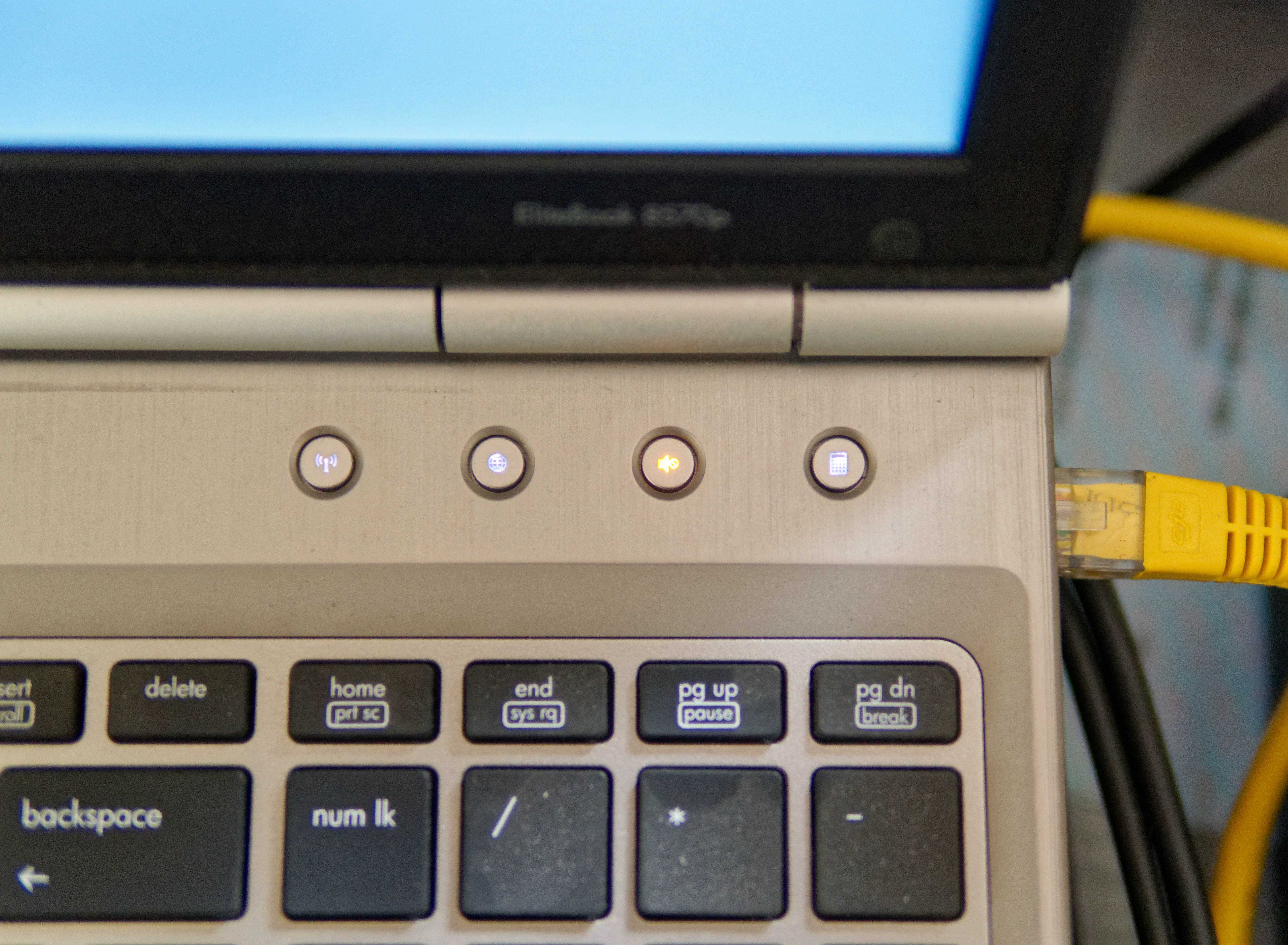
On with trying to get bde.lemis.com to work correctly. First, why does the microphone not work? Again Google Gemini to my aid. There's a button on the keyboard, second from the right:
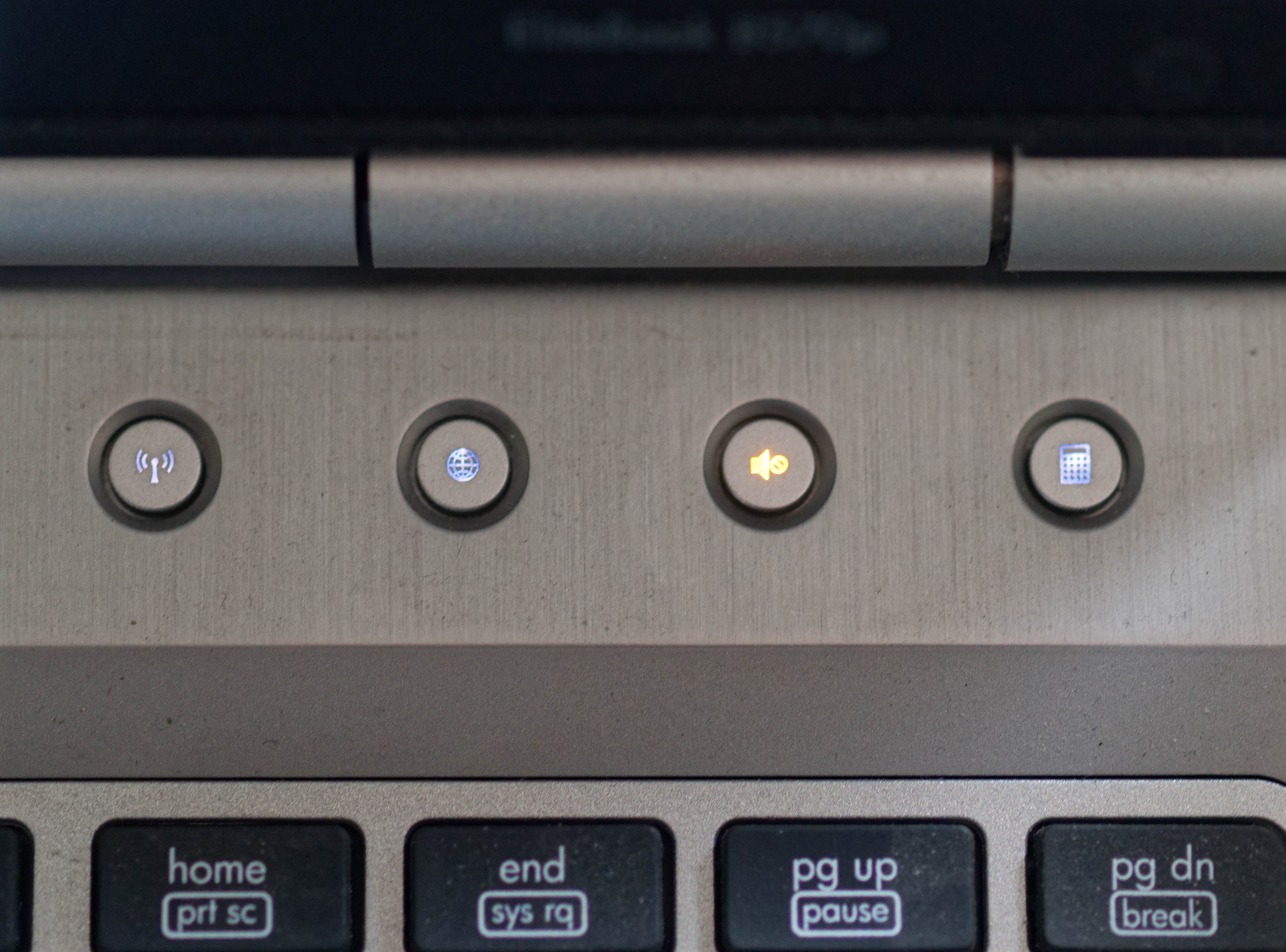
If it lights orange (like here), the microphone is disabled. Press it and it will go out or light white.
But it didn't. Disabled from BIOS? Reboot and take a look. Password, please. But I don't know any password, and I can't ask Bruce. The twins again:
For EliteBook models, HP Support can generate a SMC.bin file tailored to your laptop's UUID (Universally Unique Identifier). You will need to prove ownership of the device.
And how do I do that? I didn't buy the device, and I don't have any paperwork. Anyway, I can try. Call HP on 02 8278 1039 (there's also a 0300 number, but they're more expensive). Another bloody voice non-recognition system. What kind of device is it? A list, not including laptops. Ah, that's a notebook. Are you calling about the progesss of a repair? No. Sorry, missed that. Are you calling about the progesss of a repair? No. Sorry, missed that. Enter 0 or 1.
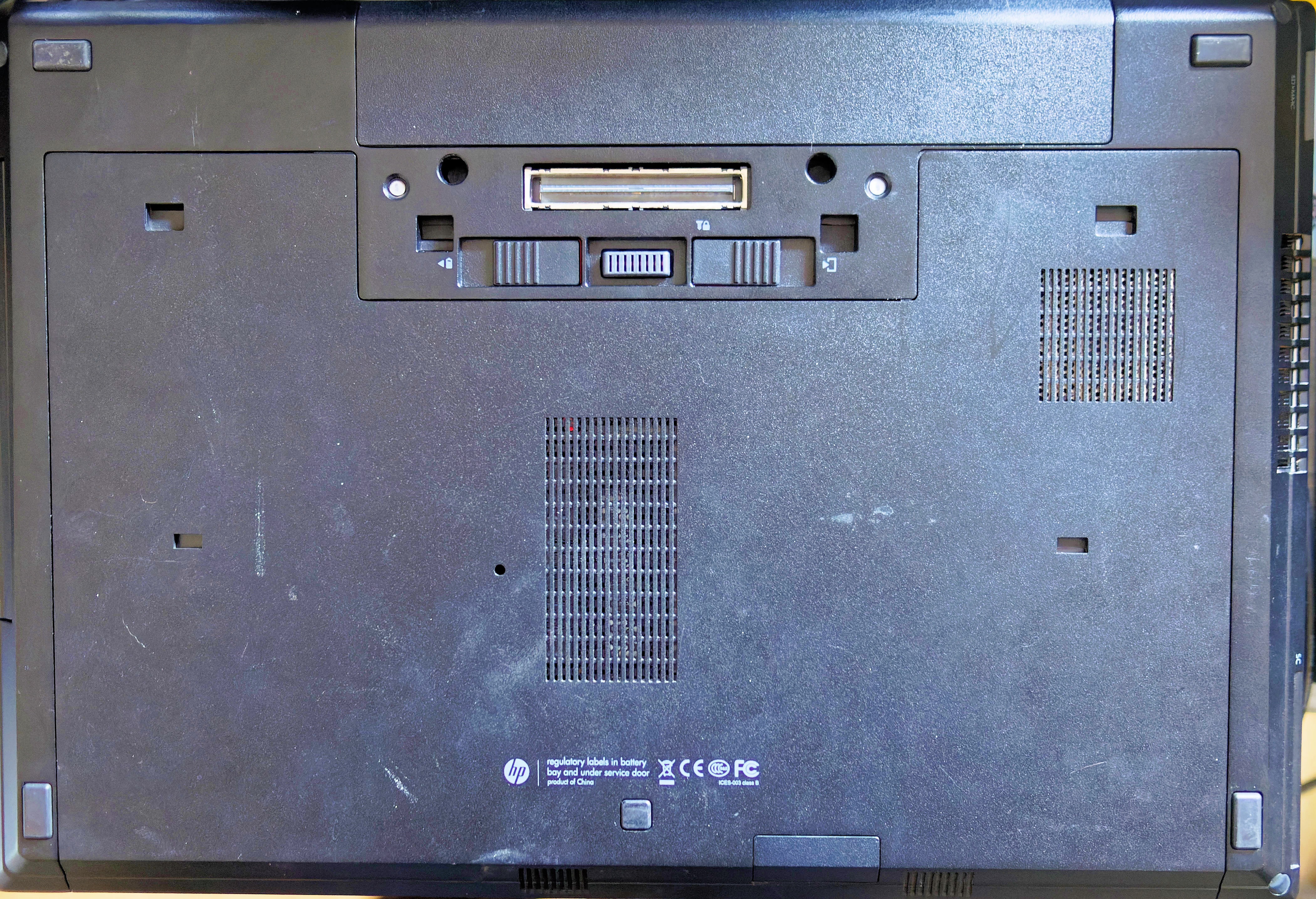
What's wrong with a system that can recognize “laptop”, but not “no” in response to a yes/no question? In any case, I was connected to Neha (why do these people all have such unusual names?). The first thing she wanted to know was whether she could call back on this number in case of disconnection. Unusual, but why not? Then she wanted to know model and serial number, of course. Where's the serial number? On the underside.
Nope:
|
|||||||||||||||||||||||

|
|||||||||||||||||||||||
That looks very much like I need to dismantle the device to find the serial number! Never mind, says Neha. Click on the icon at the bottom. No icon, of course. She didn't even ask what operating system I was running. Log in. Hang. Ah, yes, of course, I had disconnected the network cable to turn the thing upside down. But while I was fixing that, the call got disconnected. And sure enough, she called back almost immediately. But not as immediately as the next call got disconnected. And that was the last I heard of her.
Somehow HP have serious issues somewhere. I can't be overly bothered.
A bit more searching brought me to dmidecode, which can access internal data. And it gave me the serial number: 5CB2480314, and also the information that the processor is an Intel Core i5 3320M. But that's not much help.
So what do I do now? Find a potential jumper that can reset the BIOS data, including data that I might need? Or just give up and use an external microphone? Found one that cost $5.35 including postage, so I bought that and postponed the sound until next week.
Then the question of remapping the keyboard. Created a keymap file /usr/share/vt/keymaps/grog.kbd and loaded it. How about that, it really does work, and though I “didn't change anything”, Alt was also remapped to its correct place. But somehow it doesn't work (yet) on reboot.
And lagg? Tried the invocation exactly as stated, and how about that, it came up! What I missed was the first part:
# Bring the physical ports up without IPs
ifconfig_em0="up"
wlans_iwn0="wlan0"
ifconfig_wlan0="WPA"
And the result was that neither em0 nor wlan0 had any IP address. That belonged to lagg0. Of course, that used DHCP to get the IP address, coincidentally 192.109.197.244 instead of 192.109.197.144. OK, no worries. Bring up lagg with an explicit IP address:
-ifconfig_lagg0="laggproto failover laggport em0 laggport wlan0 DHCP"
+ifconfig_lagg0="laggproto failover laggport em0 laggport wlan0 192.109.197.144"
And it still used DHCP! Why? More RTFM needed.
| Tuesday, 5 May 2026 | Dereel | Images for 5 May 2026 |
| Top of page | ||
| previous day |
|
Instant noodles again
|
Topic: food and drink, opinion | Link here |
Not much hunger this morning, time for another of these horrible instant noodle dishes, this time Pancit Canton. In principle nothing new, though this time I took the opportunity to get rid of some celery that was lying around:

|
|||||||||||||||||||||||
Another 2 packages to go. I'll be glad when this stuff is gone.
|
Macro pain
|
Topic: photography, opinion | Link here |
Taking photos this morning gave me a chance to check a number of things. First, the photos in the kitchen were the first with the new flash unit. How do things look? Here a photo of the cooking area:

|
|||||||||||||||||||||||
That was taken at f/8 instead of previously f/5.6, and that was relatively correct. That 1 EV more light, more than the difference between 300 and 400 J would suggest.
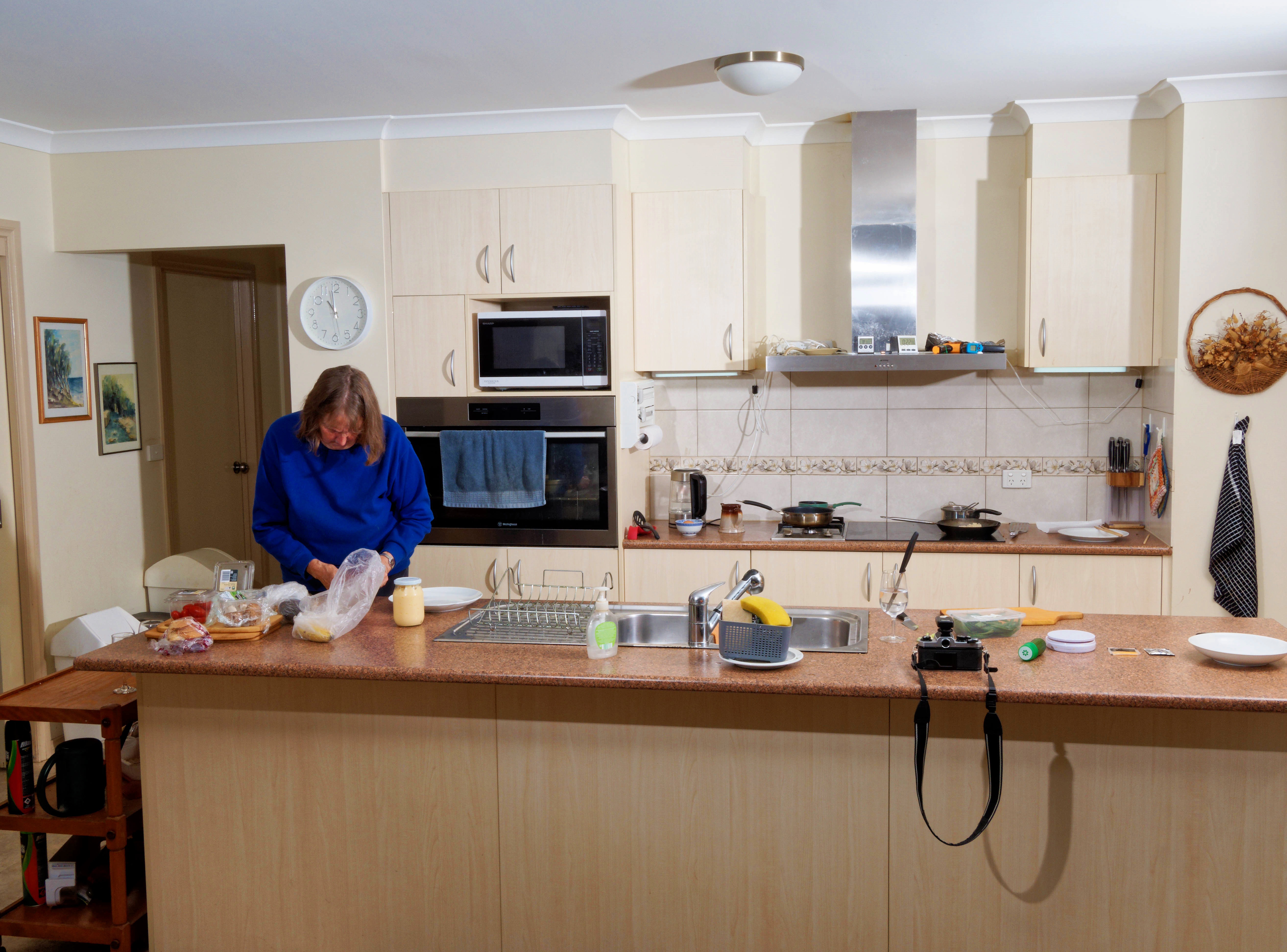
And here entire kitchen area:
|
|||||||||||||||||||||||
That looks reasonably uniform, though the flash to the right (the new Godox SK400II) was noticeably brighter, as shown by the shadows of the strap of the Nikon FM2 on the bench. And I was able to take this photo at f/16 instead of previously at f/11.
So what do I do? Swap the flash units? Maybe. I can test by dropping the output of the new unit to 225 J.
And then I wanted to take photos of the buttons on the EliteBook. How hard can it be? The point was to show the light in the microphone button, so I couldn't use flash. Used the Leica 25 mm f/1.4 Summilux to get enough light. Tried with the Olympus E-PM2, and despite confirming focus, it came out completely out of focus.
OK, try again with the Olympus OM-D E-M1 Mark II. Yes, acceptable:
|
|||||||||||||||||||||||
Why so far away? In true old Leica tradition, the Summilux can't focus any closer. OK, that's what extension tubes are for. Put on a 10 mm tube, and... the thing wouldn't focus at all. Why? It's nothing but a pipe. I need to check, and that could take time, but it looks as if there may be some electronic misunderstanding, maybe the autofocus for the OM-1 Mark II.
OK, nothing for it. Get the Zuiko Digital 50 mm f/2 macro and take my photos. That worked, and as I observed 60 years ago, the apertures in this range don't reflect the light gathering ability: the Zuiko required 2/3 EV more exposure than the Summlux, when it should have been 1 EV. But finally I had my photo.
|
More photos with the Nikon FM2
|
Topic: technology, history, opinion | Link here |
I was recently reminded that I still have a film in the Nikon FM2. It has the same rating as my OM System OM-1 Mark II, and the flash sync speed is the same (1/250 s, extraordinary for a camera introduced in 1984), so I can use the same settings. But how do I record them? I took four images of the kitchen along with the ones above. I think they were:
| Pan | f/8 | |
| Kitchen | f/16 | |
| ? | f/16? | |
| Pan | f/11 |
But where should I collect this information? And in passing, focussing with this kind of camera is so much more difficult than with a modern camera. I need to compare it with the Pentax Spotmatic, which I found really good in those even further-off days.
|
bde lives!
|
Topic: technology, opinion | Link here |
I am gradually configuring bde.lemis.come the way I want it. All I need is a sane keyboard and to get lagg to work. Checked the details in various places. Yes, what I had written was correct, with one or two exceptions: I hadn't specified a net mask, and the end of the line was missing. It was on the keyboard map specification too.
OK, fix that, and... it works! Here the diff:
--- /etc/rc.conf.d/lagg 2026/05/05 02:54:47 1.1
+++ /etc/rc.conf.d/lagg 2026/05/05 04:04:00
@@ -5,4 +5,4 @@
ifconfig_wlan0="WPA"
# Create the virtual failover interface
cloned_interfaces="lagg0"
-ifconfig_lagg0="laggproto failover laggport em0 laggport wlan0 192.109.197.144"
\ No newline at end of file
+ifconfig_lagg0="laggproto failover laggport em0 laggport wlan0 192.109.197.144 netmask 255.255.255.0"
Now why is the system so slow?
Do you have a comment about something I have written? This is a diary, not a “blog”, and there is deliberately no provision for directly adding comments. It's also not a vehicle for third-party content. But I welcome feedback and try to reply to all messages I receive. See the diary overview for more details. If you do send me a message relating to something I have written, please indicate whether you'd prefer me not to mention your name. Otherwise I'll assume that it's OK to do so.
| Top of page | Previous month | Greg's home page | Today's diary entry | Greg's photos | Copyright information |


